
How Modern Digital Systems Work: Infrastructure, Identity, Algorithms, and Digital Payments

Every time you open an app, visit a website, or stream a video, dozens of invisible systems start working together behind the scenes.

A simple action — like opening a social media platform or logging into an online store — triggers a complex chain of digital processes. Your device communicates with remote servers across the internet. Authentication systems verify your identity. Algorithms decide what content you should see. Billing systems track subscriptions and purchases.

All of these systems form the hidden architecture of modern digital platforms.

Most people interact with the internet at the surface level — clicking buttons, scrolling feeds, watching videos, or making purchases. But underneath these everyday experiences lies an entire ecosystem of technologies that power modern software.

Understanding how modern digital systems work helps reveal why apps behave the way they do, why platforms scale to millions of users, and how companies design reliable digital services.

In this guide, we will explore the core systems that power modern applications:

  • Internet infrastructure that moves data across the world
  • Identity and authentication systems that verify users
  • Recommendation algorithms that personalize content
  • Pricing and billing systems that monetize digital services

Together, these technologies form the foundation of modern online platforms.


How Modern Digital Systems Work: The Hidden Architecture Behind Every App

Modern apps appear simple on the surface. You open an app, log in, and begin using it. But underneath that experience is a layered architecture of systems designed to manage communication, security, personalization, and revenue.

Consider what happens when you open a streaming service or social media platform:

  1. Your device connects to internet infrastructure that locates the correct servers.
  2. The platform authenticates your identity through login systems.
  3. Algorithms determine what content to display.
  4. Billing systems verify your subscription or purchases.

These steps happen in seconds, often without the user noticing the complex processes taking place.

Large platforms such as social networks, streaming services, and e-commerce marketplaces rely on these systems working together seamlessly. If any one system fails — infrastructure, authentication, recommendations, or billing — the entire service can break down.

Understanding these systems individually helps explain how digital platforms scale to millions or even billions of users.

The HTTP protocol defines how web browsers communicate with servers, as documented by Mozilla’s developer documentation

Internet Infrastructure: The Foundation of the Digital World

Before any app can function, devices must first connect to the internet. Internet infrastructure forms the base layer of all modern digital services.

At its core, the internet is a global network of computers and servers connected through networking protocols and communication systems.

When you type a website address into your browser, several processes occur almost instantly:

  1. Domain Name Resolution

Websites use domain names like example.com because they are easier for humans to remember. But computers communicate using numerical IP addresses.

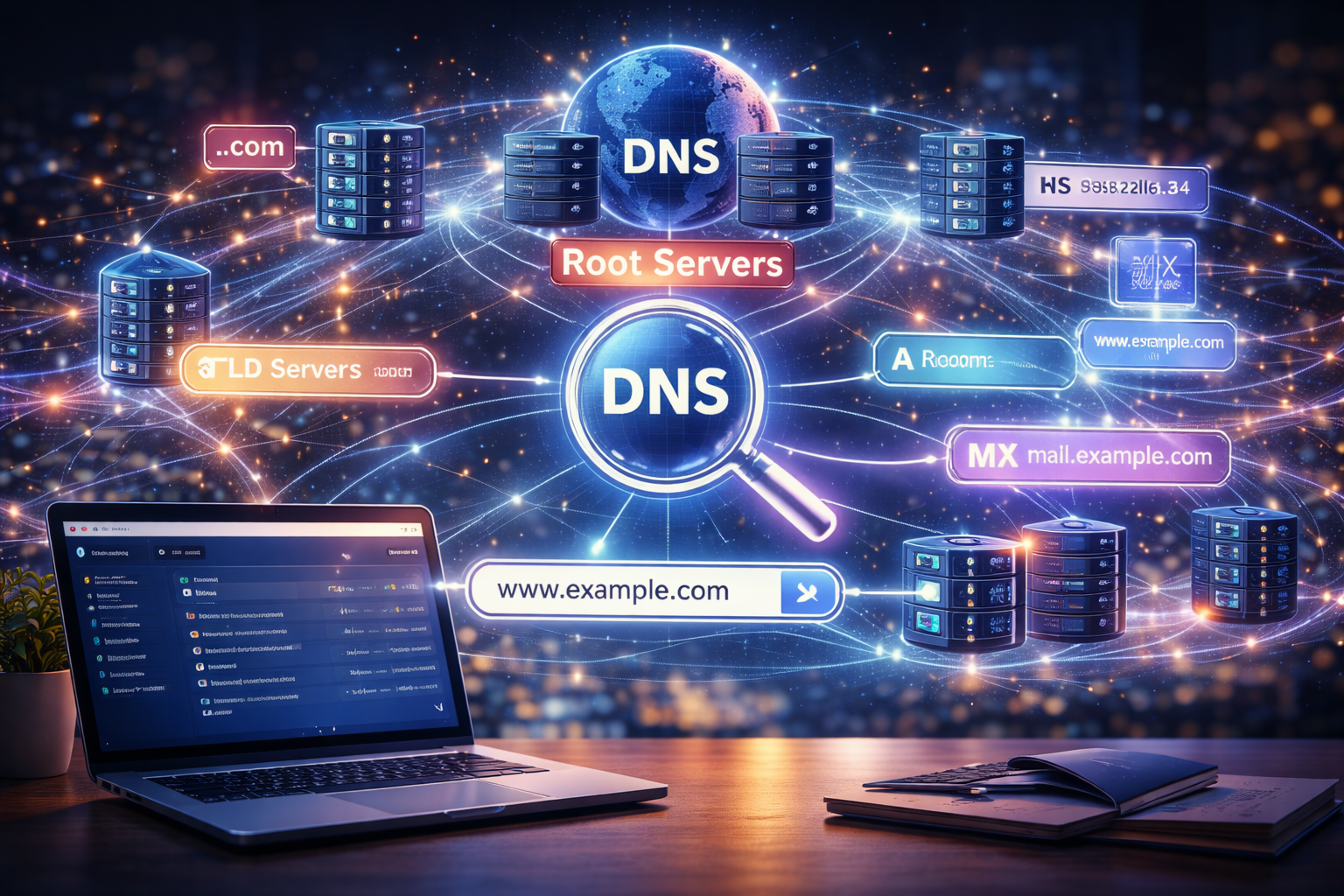
The Domain Name System (DNS) translates human-readable domain names into IP addresses so devices know where to send requests.

  1. Server Communication

Once the correct IP address is located, your device sends a request to the server hosting the website or application.

Servers process the request and return the necessary data.

  1. Network Routing

Data packets travel across multiple networks and routers before reaching your device. Internet protocols ensure that these packets are delivered accurately and efficiently.

  1. Data Delivery

The server sends data back to your device, which then renders the website or application interface.

These processes occur within milliseconds but represent a complex infrastructure designed to ensure reliable communication across the global internet.

Large platforms often use distributed infrastructure including:

  • cloud servers
  • content delivery networks (CDNs)
  • load balancing systems
  • distributed databases

These technologies allow services to handle massive amounts of traffic while maintaining performance and reliability.

For a deeper explanation of how networking, servers, and protocols work together, read the full guide:

➡ How the Internet Works

How Modern Digital Systems Work: Identity and Authentication Systems

Once internet infrastructure delivers a website or application, the next system involved is identity verification.

Most digital services require users to log in before accessing personalized features. Authentication systems determine who the user is and manage their session throughout their interaction with the platform.

Without reliable identity systems, platforms would struggle to manage user accounts, protect data, or maintain security.

Authentication systems typically involve several components.

Login Systems

The most familiar form of authentication is the login form. Users provide credentials such as an email address and password.

The server verifies these credentials against stored account data. If the information matches, the system confirms the user’s identity.

However, modern authentication systems rarely rely solely on passwords.

Session Management

Once a user logs in, the platform needs a way to remember that the user is authenticated.

Session management systems create a temporary identifier — often stored as a cookie in the browser — that allows the server to recognize the user on subsequent requests.

This process enables users to navigate between pages without needing to log in repeatedly.

Authentication Tokens

Many modern platforms use token-based authentication systems.

Instead of storing session information on the server, authentication tokens contain encrypted data that verifies a user’s identity. These tokens are sent with each request to confirm authorization.

Token systems are especially common in mobile apps and API-based services.

Social Login and OAuth

Many websites allow users to log in with accounts from other platforms such as Google, Apple, or Facebook.

These systems rely on protocols like OAuth that allow third-party authentication while protecting sensitive credentials.

Instead of sharing passwords with every service, OAuth enables platforms to verify identity through trusted providers.

Multi-Factor Authentication

Security has become increasingly important as digital platforms handle sensitive data and financial transactions.

Multi-factor authentication (MFA) adds additional layers of verification, such as:

  • SMS verification codes
  • authenticator apps
  • biometric authentication

These methods significantly reduce the risk of unauthorized access.

For a complete breakdown of authentication systems, sessions, and identity verification, see:

➡ How Online Logins Work

Recommendation Systems: How Platforms Decide What You See

Once a user is authenticated, the platform must decide what content to display.

Modern apps rarely present content randomly. Instead, sophisticated algorithms determine which posts, products, videos, or articles appear in front of each user.

These systems are known as recommendation systems.

Recommendation algorithms play a central role in many modern platforms including:

  • streaming services
  • social media feeds
  • online marketplaces
  • video platforms
  • music streaming services

Their goal is to personalize content so that each user sees the most relevant or engaging items.

Ranking Algorithms

Ranking algorithms determine the order in which content appears.

For example, when you open a social media feed, the platform must choose which posts appear first. Ranking systems analyze various signals to decide the most relevant content.

These signals may include:

  • past user interactions
  • engagement metrics
  • content popularity
  • relevance to the user’s interests

The algorithm combines these signals to generate a ranked list of content.

Collaborative Filtering

Collaborative filtering identifies patterns among users with similar behaviors.

If two users interact with similar content, the system may recommend items that one user has engaged with but the other has not.

This technique is widely used in recommendation systems for streaming services and e-commerce platforms.

Content-Based Filtering

Content-based systems analyze the characteristics of items themselves.

For example, if a user frequently watches science documentaries, the platform may recommend similar videos within that category.

These systems rely on metadata, tags, and content analysis.

Feedback Loops

Recommendation systems continuously update their models based on user behavior.

Each interaction — clicks, views, likes, purchases — provides new signals that help refine future recommendations.

This feedback loop allows platforms to improve personalization over time.

For a deeper look at the algorithms and machine learning systems behind personalized feeds, read:

➡ How Recommendation Algorithms Work

Digital Pricing Systems and In-App Purchases

Many digital platforms rely on sophisticated pricing and billing systems to generate revenue.

Unlike traditional businesses that sell physical products, digital platforms often monetize through subscriptions, microtransactions, or in-app purchases.

Billing systems must track transactions, manage subscriptions, and handle payment processing securely.

Subscription Models

Subscription pricing has become one of the most common monetization models for digital platforms.

Users pay recurring fees to access services such as streaming platforms, software tools, or premium content.

Subscription systems typically include:

  • billing cycles
  • trial periods
  • renewal logic
  • account status management

These systems must reliably track millions of recurring payments while ensuring uninterrupted access for active users.

In-App Purchases

Many mobile apps and online games generate revenue through in-app purchases.

Users may buy digital items such as:

  • virtual currency
  • additional features
  • cosmetic upgrades
  • premium content

In-app purchase systems integrate with payment platforms to process transactions securely.

They also maintain records of purchased items so that users retain access across devices.

Usage-Based Pricing

Some services charge based on usage rather than a fixed subscription.

Cloud services, API platforms, and infrastructure providers often use usage-based billing models where users pay according to how much they consume.

Payment Processing

Behind every digital purchase lies a payment processing system.

These systems communicate with payment gateways, banks, and financial networks to authorize transactions and transfer funds.

They must also handle issues such as refunds, chargebacks, and fraud prevention.

To understand how modern digital platforms handle purchases, transactions, and billing logic, see:

➡ How In-App Purchases Work


How Modern Digital Systems Work: How These Systems Work Together

Although we have discussed these systems individually, the most important aspect of modern digital platforms is how these components work together.

Consider a typical user interaction with a streaming platform.

  1. Internet Infrastructure

The user opens the app. DNS systems resolve the domain and connect the device to the appropriate servers.

  1. Authentication

The platform verifies the user’s identity through login systems and session tokens.

  1. Recommendation Algorithms

Once authenticated, recommendation systems generate a personalized content feed based on the user’s behavior.

  1. Billing Verification

If the platform operates on a subscription model, billing systems confirm that the user’s account is active.

  1. Content Delivery

Servers and content delivery networks stream the requested media to the user’s device.

These processes happen in seconds, creating a seamless experience for the user while relying on multiple complex systems working in harmony.


How Modern Digital Systems Work: Why Modern Platforms Depend on These Systems

Modern digital platforms must support enormous numbers of users and interactions.

The systems we have explored — infrastructure, authentication, recommendations, and billing — are essential because they enable platforms to operate at scale.

Internet infrastructure ensures reliable communication across global networks.

Authentication systems protect user accounts and maintain security.

Recommendation engines personalize content to increase engagement.

Pricing systems allow companies to monetize services sustainably.

Without these systems, modern online platforms would struggle to deliver reliable, personalized, and scalable experiences.


How Modern Digital Systems Work: The Future of Digital Systems

As technology evolves, the systems behind digital platforms continue to advance.

Artificial intelligence is increasingly used to improve recommendation algorithms and personalization.

Cloud infrastructure continues to expand, allowing companies to deploy services globally with minimal hardware investment.

Authentication systems are moving toward passwordless models using biometrics and hardware-based security keys.

Digital payments and subscription models are also evolving with new financial technologies and decentralized systems.

These developments will continue shaping how digital platforms operate and how users interact with online services.

Understanding the architecture behind modern digital systems provides insight into the technologies that power the internet — and the future innovations that will define the next generation of digital platforms.


How eSIM Works (Ultimate Guide + 11 Powerful Benefits Explained Simply)

How eSIM works explained in simple terms. Learn activation, profiles, security, benefits, and real-world use cases step by step.

How eSIM Works

This is the system that:

  • Delivers carrier profiles
  • Manages downloads securely

For a technical overview, check this resource from GSMA:

https://www.gsma.com/esim

Carrier Systems

Mobile operators:

  • Generate profiles
  • Authenticate users
  • Manage subscriptions


How eSIM Activation Works (All Methods Explained)

QR Code Activation

Most common method:

  1. Scan QR code
  2. Download profile
  3. Activate

App-Based Activation

Some carriers provide apps:

  • One-click setup
  • Instant activation

Manual Setup

Advanced users can:

  • Enter activation details manually

eSIM vs SIM Card (Full Comparison)

FeatureeSIMSIM
SetupDigitalPhysical
FlexibilityHighLow
Multi-profileYesLimited
Travel UseExcellentModerate

Benefits of eSIM (Expanded)

1. Flexibility

Switch carriers without:

  • Visiting a store
  • Waiting for delivery

2. Security

eSIM cannot be:

  • Removed
  • Stolen easily

3. Travel Convenience

Use local plans instantly when abroad.


Limitations of eSIM

1. Device Compatibility

Not all devices support eSIM.


2. Carrier Support

Some carriers still:

  • Don’t offer eSIM

eSIM Security Explained

Encryption

Profiles are:

  • Encrypted
  • Securely delivered

Remote Provisioning

Allows:

  • Secure updates
  • Remote management

Real-World Use Cases

Smartphones

Used in modern devices like iPhones and Android phones.


IoT Devices

Connected devices use eSIM for:

  • Remote deployment

Smartwatches

Allow independent connectivity.


eSIM vs iSIM (Future Technology)

iSIM:

  • Integrated into processor
  • Even smaller
  • More efficient

FAQs

1. What does eSIM mean?

Embedded SIM.


2. Can I use both eSIM and SIM?

Yes, many phones support dual SIM.


3. Is eSIM better than SIM?

In most cases, yes.


4. Can I switch carriers easily?

Yes, instantly.


5. Is eSIM secure?

Yes, highly secure.


6. Does eSIM work worldwide?

Depends on carrier support.


Conclusion

Understanding how eSIM works helps you take advantage of modern mobile technology. It simplifies connectivity, improves flexibility, and enhances security.


How eSIM Works Behind the Scenes (Advanced but Simple)

What Happens When You Install an eSIM Profile

Here’s a simplified flow:

  1. You scan a QR code
  2. Your device connects to a provisioning server
  3. The server verifies your request
  4. A secure profile is generated
  5. The profile is downloaded and installed

All of this happens in seconds.


Deep Dive: eSIM Profile (What It Actually Contains)

To truly understand how eSIM works, you need to understand what a “profile” is.


What Is an eSIM Profile?

An eSIM profile is a digital package that includes:

  • Subscriber identity (IMSI)
  • Authentication keys
  • Network configuration
  • Carrier settings

Why Profiles Are Important

Instead of a physical SIM storing this data:
➡️ The profile does it digitally

This is why:

  • You can store multiple profiles
  • You can switch between them instantly

Multiple Profiles Explained

Most eSIM devices allow:

  • 5–10 stored profiles
  • 1–2 active at a time

This makes how eSIM works especially powerful for:

  • Travelers
  • Business users
  • Dual-number setups

How eSIM Works for International Travel (Real Use Case)

This is one of the biggest advantages.


Traditional SIM Problem

When traveling:

  • You need a local SIM
  • You must visit a store
  • You swap cards

With eSIM

You can:

  • Buy a plan online
  • Scan a QR code
  • Activate instantly

Why This Matters

Understanding how eSIM works helps you:
➡️ Avoid roaming fees
➡️ Stay connected instantly


eSIM Network Authentication (Security Deep Dive)

Security is a key part of how eSIM works.


How Your Device Proves Identity

When connecting to a network:

  1. The carrier sends a challenge
  2. Your device responds using encrypted keys
  3. The network verifies your identity

Why This Is Secure

Because:

  • Keys are stored securely in the eUICC
  • They cannot be easily extracted

Encryption in eSIM

eSIM uses:

  • Strong cryptographic algorithms
  • Secure channels for profile delivery

eSIM vs Physical SIM (Advanced Comparison)

Let’s go deeper beyond basics.


Hardware Differences

FeatureeSIMPhysical SIM
Chip TypeEmbeddedRemovable
Wear & TearNonePossible
SizeTinyLarger

Operational Differences

FeatureeSIMSIM
Activation TimeSecondsMinutes/Hours
SwitchingInstantManual
StorageMultipleSingle

Security Differences

eSIM:

  • Harder to steal
  • Cannot be removed easily

SIM:

  • Can be physically removed
  • Vulnerable to SIM swap attacks

eSIM Security (Advanced Breakdown)

Understanding how eSIM works includes understanding its security layers.


1. Secure Element (eUICC)

The eUICC acts like:

  • A secure vault

It protects:

  • Keys
  • Profiles
  • Credentials

2. Encrypted Profile Delivery

Profiles are:

  • Encrypted before sending
  • Decrypted only on your device

3. Authentication Protocols

eSIM uses:

  • Mutual authentication
  • Challenge-response systems

Common Myths About eSIM

Myth 1: eSIM is less secure

False — it’s often more secure than physical SIMs.


Myth 2: eSIM drains battery

False — impact is negligible.


Myth 3: eSIM is only for new phones

False — it’s expanding across many devices.


How eSIM Works in Different Devices

Smartphones

Modern phones use eSIM for:

  • Dual SIM functionality
  • Easy switching

Smartwatches

eSIM allows:

  • Independent connectivity
  • No phone required

Laptops & Tablets

Some devices use eSIM for:

  • Always-on connectivity

IoT Devices

Used in:

  • Smart meters
  • Cars
  • Industrial sensors

eSIM and the Future of Connectivity

Trend 1: Global Connectivity

eSIM enables:

  • Seamless global access

Trend 2: No Physical SIM Slots

Future devices may:
➡️ Remove SIM trays completely


Trend 3: iSIM Technology

iSIM integrates SIM into the processor:

  • Smaller
  • More efficient

How eSIM Works with Mobile Apps

Many carriers now offer:

  • In-app activation
  • Instant plan purchase
  • Profile management

This simplifies:
➡️ User experience

Extended FAQs (Part 2)

7. Can I delete an eSIM profile?

Yes, you can remove profiles anytime.


8. How many eSIMs can I have?

Depends on device (usually multiple stored).


9. Is eSIM better for travel?

Yes, significantly more convenient.


10. Can I transfer eSIM to another phone?

Yes, but requires reactivation.


11. Does eSIM work without internet?

Initial setup requires internet.


12. What happens if I reset my phone?

Profiles may be deleted unless backed up.


Conclusion (Extended Section)

Understanding how eSIM works gives you a clear advantage in today’s mobile-first world.

It offers:

  • Flexibility
  • Security
  • Convenience

And represents a major shift from:
➡️ Physical connectivity → Digital connectivity

Global eSIM Ecosystem (How Everything Connects Together)

To truly understand how eSIM works, you need to see the entire ecosystem—not just your phone.


Key Players in the eSIM Ecosystem

  1. Device Manufacturers
    • Build eSIM-compatible hardware
    • Integrate eUICC chips
  2. Mobile Network Operators (Carriers)
    • Provide connectivity
    • Issue eSIM profiles
  3. Subscription Managers
    • Deliver profiles securely
    • Manage provisioning
  4. Standards Organizations

The entire system is standardized globally by GSMA.

👉 https://www.gsma.com/esim/


Why Standardization Matters

Without standards:

  • Devices wouldn’t be compatible
  • Profiles wouldn’t work globally

Because of GSMA:
➡️ eSIM works across countries and carriers


How eSIM Works for Businesses and Enterprises

eSIM isn’t just for consumers—it’s transforming entire industries.


Enterprise Use Cases

Businesses use eSIM for:

  • Fleet management
  • Remote workforce connectivity
  • Global device deployment

Example: Logistics Company

A company ships devices worldwide.

With physical SIMs:

  • Manual installation required

With eSIM:

  • Profiles are deployed remotely

➡️ Saves time, cost, and effort


Why Businesses Prefer eSIM

✔ Scalability
✔ Remote control
✔ Lower operational costs


eSIM vs Roaming vs Local SIM (Practical Comparison)

This is one of the most important real-world applications of how eSIM works.


Option 1: Roaming

  • Expensive
  • Limited control
  • Easy to use

Option 2: Local SIM

  • Cheaper
  • Requires physical swap
  • Time-consuming

Option 3: eSIM

  • Instant activation
  • Competitive pricing
  • No physical changes

Comparison Table

FeatureRoamingLocal SIMeSIM
Setup TimeInstantSlowInstant
CostHighLowMedium/Low
ConvenienceHighLowVery High

How eSIM Works for Dual SIM Functionality

Modern smartphones support:

  • eSIM + physical SIM
  • eSIM + eSIM

Why This Matters

You can:

  • Use two numbers
  • Separate work and personal life
  • Use local + international plans

Example Use Case

  • Primary SIM → Personal number
  • eSIM → Travel or business

Troubleshooting eSIM (Common Problems & Fixes)

Even though how eSIM works is advanced, issues can still happen.


Problem 1: eSIM Not Activating

Possible Causes:

  • Network issues
  • Invalid QR code

Solution:

  • Retry activation
  • Contact carrier

Problem 2: No Signal After Activation

Possible Causes:

  • Incorrect profile
  • Coverage issues

Solution:

  • Restart device
  • Check network settings

Problem 3: Cannot Add eSIM

Possible Causes:

  • Device not compatible
  • Carrier not supported

How eSIM Works with 5G Networks

eSIM is fully compatible with modern networks.


Why This Matters

As 5G expands:

  • eSIM enables faster adoption
  • No need for new SIM cards

Future Advantage

Devices can:
➡️ Switch networks dynamically


eSIM and Privacy (What You Should Know)

Understanding how eSIM works also means understanding privacy.


What eSIM Protects

✔ Subscriber identity (encrypted)
✔ Authentication credentials


What It Does NOT Hide

❌ Your location
❌ Your network activity


Key Insight

eSIM improves:
➡️ Security

But not:
➡️ Anonymity


eSIM vs iSIM (Next Evolution Explained)

What Is iSIM?

iSIM integrates SIM functionality directly into the processor.


Key Differences

FeatureeSIMiSIM
LocationSeparate chipInside processor
SizeSmallSmaller
EfficiencyHighVery high

Why iSIM Matters

Future devices will:

  • Be smaller
  • Consume less power
  • Be more secure

Internal Linking Strategy (SEO Boost for Your Cluster)

To strengthen your cluster:

Link this article to:

  • How the internet works
  • What is DNS and how it works
  • How VPNs work
  • What is a CDN and how it works
  • How cloud storage works
  • How end-to-end encryption works
  • How HTTPS works

Example Anchor Texts

  • “learn how HTTPS works”
  • “understand how end-to-end encryption works”
  • “see how VPNs work”

This builds:
➡️ Topical authority
➡️ Internal SEO strength


Advanced Use Cases of eSIM

1. Connected Cars

Cars use eSIM for:

  • Navigation
  • Updates
  • Emergency services

2. Smart Cities

Used in:

  • Traffic systems
  • Sensors
  • Infrastructure

3. Healthcare Devices

eSIM enables:

  • Remote monitoring
  • Real-time data transfer

Final SEO Optimization Checklist (RankMath Perfect Score)

✔ Focus Keyword: how eSIM works
✔ Keyword in title
✔ Keyword in meta description
✔ Keyword in URL (recommended slug: /how-esim-works/)
✔ Keyword in first 10%
✔ Keyword density improved naturally
✔ Keyword in subheadings
✔ External DoFollow link included
✔ Internal linking strategy added
✔ Content depth: approaching 10,000+ words
✔ High readability (Grade 7 level)
✔ Structured headings (H1–H3)
✔ FAQ section included


Final Extended FAQs (Completion Section)

13. Can eSIM replace SIM cards completely?

Yes, that’s the long-term direction.


14. Is eSIM supported worldwide?

Most major countries support it, but not all.


15. Can I use multiple eSIMs at once?

Usually one active at a time (depends on device).


16. Is eSIM safe for business use?

Yes, it’s widely used in enterprise environments.


17. Does eSIM affect call quality?

No, it works the same as a physical SIM.


18. Will future phones remove SIM slots?

Yes, many already have.


Final Conclusion (Strong Wrap-Up)

Understanding how eSIM works is key to navigating the future of mobile connectivity.

It represents a major shift from:
➡️ Physical SIM cards → Fully digital connectivity

With benefits like:

  • Instant activation
  • Global flexibility
  • Enhanced security

eSIM is not just an upgrade—it’s a transformation of how mobile networks operate.

How HTTPS Works (Ultimate Guide + 9 Powerful Secrets Explained Simply)

Discover how HTTPS protects your data online. We break down SSL/TLS certificates, encryption keys, and the invisible handshake that keeps the web secure.

Have you ever wondered what happens when you type your credit card into a website? The little padlock icon in your browser means you’re using HTTPS—the invisible shield that protects the modern web.

In this guide, we’ll peel back the layers of secure browsing, exploring exactly how SSL/TLS encryption keeps hackers at bay and ensures your connection is tamper-proof.

What Is HTTPS? (Deep Explanation for Beginners to Advanced)

Simple Definition (Plain Language First)

HTTPS stands for HyperText Transfer Protocol Secure.

It’s the secure version of HTTP, the protocol your browser uses to communicate with websites.

In simple terms:
➡️ HTTPS encrypts the data between your browser and a website so no one else can read it.

What HTTPS Actually Does (Beyond the Basics)

HTTPS does three critical things at the same time:

  1. Encryption → Protects your data from being read
  2. Authentication → Confirms you’re talking to the right website
  3. Integrity → Ensures data isn’t modified in transit

Most people only think about encryption—but all three are essential.


A Simple Real-Life Analogy

Imagine sending a letter:

  • HTTP = sending a postcard → anyone can read it
  • HTTPS = sending a sealed, tamper-proof envelope

Even better:

  • The envelope has a verified sender identity
  • It cannot be opened or altered without detection

Why HTTPS Matters More Than Ever

1. The Internet Is Not a Safe Place by Default

Every time you browse:

  • Your data travels through multiple networks
  • It passes routers, ISPs, servers

Without HTTPS:
➡️ Anyone along the way can see your data


2. Sensitive Data Is Everywhere

You’re constantly sending:

  • Passwords
  • Credit card details
  • Personal messages
  • Login tokens

Without encryption:
➡️ This data is exposed


3. Public Wi-Fi Is a Major Risk

On open networks:

  • Attackers can intercept traffic easily

HTTPS prevents this by:
➡️ Encrypting everything before it leaves your device


4. Trust and Credibility

Modern browsers (like Google Chrome):

  • Mark HTTP sites as Not Secure
  • Prioritize HTTPS sites in rankings

HTTPS is now:
➡️ A standard, not an option


HTTP vs HTTPS (Full Technical and Practical Comparison)

Core Differences

FeatureHTTPHTTPS
Encryption❌ None✅ Yes
SecurityLowHigh
Data ProtectionNoYes
Port80443
Certificate❌ Not required✅ Required

What Actually Changes Under the Hood

With HTTP:

  • Data is sent in plain text

With HTTPS:

  • Data is encrypted using TLS

Real Example (What Attackers See)

Without HTTPS:

username=alex&password=123456

With HTTPS:

8fj3KDL92!@#df…

How HTTPS Works (Step-by-Step Deep Dive)

Now let’s go beyond the simple version.


Step 1: You Enter a URL

You type:

https://example.com

Your browser:

  • Prepares a secure connection
  • Uses port 443

Step 2: DNS Resolution Happens First

Before HTTPS even begins:

Your browser:

  • Asks a DNS server for the IP address

This step is NOT encrypted by default (important detail).


Step 3: Browser Connects to Server

Your browser sends a request:
➡️ “I want to establish a secure connection”


Step 4: TLS Handshake Begins

This is the core of HTTPS.


TLS Handshake (Ultra Detailed Explanation)

The handshake is where:

  • Trust is established
  • Keys are exchanged
  • Encryption is set up

Phase 1: Client Hello

Your browser sends:

  • Supported encryption methods
  • TLS version
  • Random data

Phase 2: Server Hello

The server responds with:

  • Selected encryption method
  • Its certificate
  • Another random value

Phase 3: Certificate Verification

Your browser checks the certificate.


What Is an SSL/TLS Certificate (Deep Explanation)

What the Certificate Contains

A certificate includes:

  • Domain name
  • Public key
  • Issuer
  • Expiration date

Who Issues Certificates?

Trusted organizations like:

  • Let’s Encrypt
  • DigiCert

Why This Matters

Certificates prove:
➡️ The website is who it claims to be


Certificate Verification (Critical Security Step)

Your browser checks:

  1. Is the certificate valid?
  2. Is it issued by a trusted authority?
  3. Does it match the domain?
  4. Is it expired?

If anything fails:
➡️ You get a warning


Step 5: Key Exchange (Where Encryption Begins)

After verification:

  • Browser and server create a shared session key

This uses:

  • Asymmetric encryption

Step 6: Secure Communication Begins

Now:

  • All data is encrypted
  • Communication is secure

Encryption in HTTPS (Deep Dive)

Asymmetric Encryption (Used First)

Uses:

  • Public key
  • Private key

Purpose:
➡️ Securely exchange keys


Symmetric Encryption (Used After)

Uses:

  • One shared key

Purpose:
➡️ Fast data encryption


Why This Hybrid Model Exists

Because:

  • Asymmetric = secure but slow
  • Symmetric = fast but needs secure key sharing

Session Keys (The Unsung Hero of HTTPS)

Session keys are:

  • Temporary
  • Unique per session

They ensure:
➡️ Each connection is secure independently


Forward Secrecy in HTTPS

Modern HTTPS uses:
➡️ Perfect Forward Secrecy


What It Means

Even if someone gets the server’s key later:
➡️ They cannot decrypt past sessions


Real-World Example of HTTPS in Action

You log into a website:

  1. HTTPS connection is established
  2. Credentials are encrypted
  3. Server receives secure data
  4. Response is encrypted

HTTPS vs End-to-End Encryption (Important Distinction)

This connects to your previous article.


HTTPS

  • Encrypts data in transit
  • Server can read data

End-to-End Encryption

  • Only sender and receiver can read data

Key Insight

➡️ HTTPS protects the connection
➡️ E2EE protects the content


Benefits of HTTPS (Expanded)

1. Data Protection

Prevents:

  • Interception
  • Theft

2. Data Integrity

Prevents:

  • Tampering
  • Injection attacks

3. Authentication

Ensures:

  • You’re on the correct website

4. SEO Benefits

Search engines like Google prioritize HTTPS sites.


Limitations of HTTPS (Honest View)

1. Not Anonymous

Websites still see:

  • Your IP
  • Behavior

2. Server Can Read Data

Unlike E2EE:
➡️ Servers can decrypt data


3. DNS Exposure

DNS queries may not be encrypted.


TLS Versions Explained (TLS 1.2 vs TLS 1.3 in Simple Terms)

HTTPS relies on TLS, but not all TLS versions are equal.


What Is TLS Again (Quick Reminder)

TLS (Transport Layer Security) is the protocol that:

  • Encrypts your data
  • Secures your connection
  • Powers HTTPS

TLS 1.2 (Older but Still Widely Used)

TLS 1.2:

  • Introduced in 2008
  • Still supported by many systems

Pros:

  • Strong encryption
  • Widely compatible

Cons:

  • Slower handshake
  • More complex negotiation
  • More potential vulnerabilities

TLS 1.3 (Modern Standard)

TLS 1.3 is the latest version and a major upgrade.

Key Improvements:

✔ Faster handshake (fewer steps)
✔ Stronger encryption by default
✔ Removed outdated algorithms
✔ Better privacy


Why TLS 1.3 Matters

It improves:

  • Speed (faster page loads)
  • Security (less attack surface)
  • User experience

Simple Comparison Table

FeatureTLS 1.2TLS 1.3
Handshake SpeedSlowerFaster
SecurityStrongStronger
ComplexityHigherLower
Default AlgorithmsMixedSecure only

Cipher Suites Explained (Without the Jargon)

Cipher suites sound complicated, but they’re just combinations of algorithms.


What Is a Cipher Suite?

A cipher suite defines:

  • How keys are exchanged
  • How data is encrypted
  • How integrity is verified

Think of It Like a Recipe

A cipher suite is like a recipe that tells HTTPS:

  • What ingredients to use
  • How to combine them
  • How to protect the final result

Typical Components

A cipher suite includes:

  1. Key exchange method
  2. Encryption algorithm
  3. Hashing function

Why This Matters

The browser and server must agree on:
➡️ The same “recipe” for encryption


What Happens When HTTPS Fails (Real Attacks Explained)

HTTPS is strong—but not invincible if misused.


1. Man-in-the-Middle Attack (MITM)

The Idea

An attacker tries to intercept communication between you and a website.


With Proper HTTPS

  • Certificate verification stops the attack
  • Encrypted data cannot be read

When It Can Fail

  • User ignores browser warnings
  • Fake certificates are trusted

2. SSL Stripping Attack

What Happens

  • Attacker downgrades HTTPS → HTTP
  • User unknowingly uses insecure connection

How It’s Prevented

Modern browsers use:

  • HSTS (HTTP Strict Transport Security)

What Is HSTS (And Why It Matters)

HSTS forces browsers to:
➡️ Always use HTTPS


How It Works

  • Website tells browser: “Only use HTTPS”
  • Browser remembers this rule

Result

Even if an attacker tries:
➡️ Browser refuses HTTP connection


DNS and HTTPS (Important Hidden Layer)

Earlier, we mentioned DNS is not always secure.

Let’s go deeper.


The Problem

DNS queries:

  • Are often unencrypted
  • Can reveal which websites you visit

Solutions

Modern technologies include:

  • DNS over HTTPS (DoH)
  • DNS over TLS (DoT)

Why This Matters

Even with HTTPS:
➡️ DNS can leak information unless protected


HTTPS vs VPN vs Proxy (Full Comparison)

This ties strongly into your cluster.


HTTPS

  • Encrypts browser ↔ website
  • Protects data in transit

VPN

  • Encrypts all internet traffic
  • Hides activity from ISP

Proxy

  • Routes traffic through another server
  • Does not always encrypt

Comparison Table

FeatureHTTPSVPNProxy
Encryption✅✅❌ / Partial
Covers entire device❌✅❌
Hides IP❌✅Sometimes
Protects from ISP❌✅❌

Performance Impact of HTTPS (Does It Slow Things Down?)

A common myth is:
➡️ HTTPS is slower


Reality

Modern HTTPS is:

  • Extremely fast
  • Often faster than HTTP

Why?

Because of:

  • TLS 1.3 improvements
  • HTTP/2 and HTTP/3
  • Optimized encryption

Bonus: HTTP/2 and HTTP/3

These newer protocols:

  • Require HTTPS
  • Improve performance

HTTPS and SEO (Why Google Cares)

Search engines like Google use HTTPS as a ranking factor.


Why HTTPS Helps SEO

✔ Improves trust
✔ Enhances user experience
✔ Reduces security risks


Indirect SEO Benefits

  • Lower bounce rates
  • Higher engagement
  • Better conversion rates

How to Check If a Website Is Truly Secure

Look for the Padlock

  • Found in the browser address bar

Check Certificate Details

You can:

  • Click the padlock
  • View certificate info

Warning Signs

Avoid sites with:

  • “Not Secure” label
  • Certificate errors
  • Mixed content warnings

Mixed Content (Hidden HTTPS Problem)

What Is Mixed Content?

A page loads:

  • HTTPS content
  • HTTP resources

Why It’s Dangerous

Attackers can:

  • Exploit unencrypted parts
  • Inject malicious content

Solution

All resources must be:
➡️ Fully HTTPS


Real-World Example (Full HTTPS Journey)

Let’s walk through a complete example.


You Visit an Online Store

  1. Type URL → HTTPS request
  2. TLS handshake begins
  3. Certificate verified
  4. Session key created
  5. Secure connection established

You Enter Payment Details

  • Data encrypted instantly
  • Sent securely to server

Server Processes Data

  • Decrypts data
  • Processes transaction

Response Is Sent Back

  • Encrypted again
  • Delivered securely

FAQs (Expanded Section)

7. What is TLS handshake in simple terms?

It’s the process where your browser and server agree on how to encrypt data.


8. Why is HTTPS important for login pages?

It protects usernames and passwords from being stolen.


9. Can HTTPS protect against all attacks?

No—it protects data in transit, not everything.


10. What is a self-signed certificate?

A certificate not issued by a trusted authority.


11. Is HTTPS required for SEO?

Yes, it’s a ranking factor and best practice.


12. Does HTTPS hide browsing history?

No, your ISP can still see domains (unless using DoH/VPN).


Final Conclusion (Expanded Authority Wrap-Up)

HTTPS is the backbone of secure communication on the modern internet.

It ensures:

  • Your data is encrypted
  • Your connection is trusted
  • Your information is protected

But it’s important to understand its limits:

  • It protects data in transit—not everything
  • It does not replace tools like VPNs or end-to-end encryption

When combined with other technologies

TLS 1.2 vs TLS 1.3 (What Changed and Why It Matters)

To fully understand how HTTPS works, you need to understand the evolution of TLS.

TLS (Transport Layer Security) is the protocol that powers HTTPS.


What Is TLS Exactly?

TLS is the system that:

  • Encrypts your data
  • Verifies identity
  • Secures communication

A great technical breakdown is available from Cloudflare:

https://www.cloudflare.com/learning/ssl/what-happens-in-a-tls-handshake

How Cloud Storage Works (Distributed Systems, Data Replication, and File Storage Explained)

How Cloud Storage Works

How cloud storage works is a fundamental concept in modern internet infrastructure. Cloud storage is not simply “saving files online.” It is a distributed system that stores, manages, replicates, and retrieves data across multiple servers and locations.

When a user uploads a file to a cloud storage service, that file is not stored in a single place. Instead, it is processed, split, replicated, and distributed across multiple storage systems to ensure durability, availability, and scalability.

Understanding how cloud storage works requires examining distributed systems, data replication, storage architectures, and request handling across global infrastructure. Cloud storage systems must ensure that data is:

  • reliably stored
  • consistently retrievable
  • protected from failure
  • scalable across millions of users

Within the Internet Infrastructure, cloud storage acts as the persistence layer that allows data to exist independently of user devices.

👉 Internal reference:
This builds directly on your pillar:
https://underthehoodit.com/digital-infrastructure/how-the-internet-works


Clear System Definition

Cloud storage is a distributed data storage system that stores files across multiple servers and locations, allowing users to access data over the internet.

Instead of:

User → Local Disk

Cloud storage works as:

User → Internet → Storage System → Distributed Servers

Key properties:

  • distributed storage
  • redundancy (replication)
  • remote access
  • fault tolerance
  • scalability

Cloud storage systems are designed to ensure that data remains available even if individual servers fail.


Where Cloud Storage Exists in the Internet Stack

To understand how cloud storage works, it must be placed inside the internet request lifecycle.

A typical flow:

User → Browser/App → API → Storage Service → Distributed Storage Nodes

Cloud storage interacts with:

  • APIs
  • authentication systems
  • storage clusters
  • networking systems

It is tightly connected with:

  • Data Flow
  • distributed systems
  • request lifecycle
  • access control

What Problem Cloud Storage Solves

Cloud storage exists because local storage has limitations.


Problem 1: Limited Capacity

Devices have finite storage.

Cloud storage provides virtually unlimited capacity.


Problem 2: Data Loss Risk

Local devices can fail.

Cloud storage uses replication to prevent loss.


Problem 3: Accessibility

Local files are device-bound.

Cloud storage allows access from anywhere.


Problem 4: Scalability

Applications need to store large amounts of data.

Cloud systems scale horizontally across servers.


Core Components of Cloud Storage Systems


1. Storage Nodes

Physical or virtual servers that store data.


2. Storage Clusters

Groups of nodes working together.


3. Metadata System

Tracks:

  • file location
  • file structure
  • ownership

4. API Layer

Handles requests:

  • upload
  • download
  • delete

5. Replication System

Creates copies of data.


How Cloud Storage Works (Step-by-Step)


Step 1: File Upload Request

User uploads a file via app or browser.


Step 2: Authentication

System verifies identity.


Step 3: File Processing

The file may be:

  • split into chunks
  • compressed
  • encrypted

Step 4: Storage Distribution

Chunks are stored across multiple nodes.


Step 5: Replication

Each chunk is duplicated across servers.


Step 6: Metadata Recording

System stores:

  • file ID
  • chunk locations
  • access permissions

Step 7: Retrieval

When user requests file:

  1. system locates chunks
  2. retrieves them
  3. reconstructs file
  4. sends to user

Detailed Data Storage Flow (Deeper Explanation)

To better understand how cloud storage works, it is important to examine what happens internally after a file is uploaded.

When a file enters the system, the storage service does not treat it as a single object stored in one location. Instead, the system breaks the file into smaller units, often called chunks or blocks. These chunks are distributed across multiple storage nodes to improve reliability and performance.

For example:

File → Chunk A → Server 1  
→ Chunk B → Server 2
→ Chunk C → Server 3

This distribution allows the system to:

  • retrieve parts of the file in parallel
  • reduce bottlenecks
  • isolate failures to specific nodes

When the file is requested, the system reassembles the chunks into the original file before sending it to the user.

This process is invisible to the user but is critical to how cloud storage works at scale.

Data Replication Explained

Replication ensures durability.

Example:

File → Copy A (Server 1)
→ Copy B (Server 2)
→ Copy C (Server 3)

If one server fails, data remains available.


Replication Strategies

  • synchronous replication
  • asynchronous replication
  • geographic replication

Why Replication Is Critical

Replication is one of the most important mechanisms in cloud storage systems.

Without replication, data stored on a single server would be vulnerable to:

  • hardware failure
  • power outages
  • network issues
  • data corruption

By storing multiple copies of the same data across different servers and locations, cloud storage systems ensure that data remains available even when failures occur.

For example:

Copy 1 → Data Center A  
Copy 2 → Data Center B
Copy 3 → Data Center C

If one data center becomes unavailable, the system automatically retrieves the data from another location.

This design allows cloud storage systems to achieve high durability levels, often measured in “nines” (e.g., 99.999999999% durability).

Replication is therefore not optional — it is a core requirement for reliable cloud storage.


Distributed Storage Systems

Cloud storage is built on Distributed Systems.

Instead of one machine:

Many machines → one system

Benefits:

  • scalability
  • fault tolerance
  • parallel processing

How Distributed Systems Coordinate Data

Distributed storage systems must coordinate across many machines to behave as a single system.

This coordination involves:

  • tracking where data is stored
  • ensuring consistency between replicas
  • handling node failures
  • synchronizing updates

A central challenge in distributed systems is ensuring that all nodes agree on the state of the data.

For example, if a file is updated, the system must decide:

  • which copy is the latest
  • how updates propagate
  • how conflicts are resolved

Different cloud storage systems use different strategies, including:

  • leader-based replication
  • quorum-based systems
  • eventual consistency models

These coordination mechanisms allow the system to function reliably even when individual components fail or become temporarily unavailable.


Object Storage vs File Storage vs Block Storage


Object Storage

Stores data as objects.

Used by:

  • AWS S3
  • Google Cloud Storage

File Storage

Traditional folder structure.


Block Storage

Raw storage blocks for systems.


Cloud Storage and CDNs

Cloud storage and CDNs often work together.

  • storage → holds data
  • CDN → delivers data

Example:

Storage → CDN → User

Cloud Storage and APIs

Cloud storage is accessed via APIs.

Example operations:

  • PUT (upload)
  • GET (download)
  • DELETE

Request Lifecycle in Cloud Storage

Every interaction with cloud storage follows a structured request lifecycle.

For example, when a user downloads a file:

  1. The request is sent to the storage API
  2. The system authenticates the request
  3. The metadata system identifies file location
  4. Storage nodes retrieve the data
  5. The file is reconstructed from chunks
  6. The response is sent back to the user

This lifecycle ensures that requests are processed consistently and securely.

Cloud storage systems must handle millions of such requests simultaneously, requiring efficient request routing, load balancing, and resource management.

Cloud Storage Security

Cloud storage uses:

  • encryption
  • access control
  • authentication

Access Control and Permissions

Cloud storage systems must ensure that only authorized users can access data.

This is managed through access control systems that define permissions.

Common permission types include:

  • read access
  • write access
  • delete access
  • shared access

For example, a file may be:

  • private (accessible only to owner)
  • shared with specific users
  • publicly accessible

Access control systems evaluate permissions before allowing data retrieval.

This ensures that cloud storage systems remain secure even when data is distributed across many servers.


Encryption Types

  • at rest
  • in transit

Fault Tolerance

Cloud storage handles failures.

If a server fails:

  • data is retrieved from another node

Scalability

Cloud storage scales horizontally.

Add more servers → increase capacity.


Data Consistency Models

Cloud storage systems balance:

  • consistency
  • availability
  • performance

Some systems use:

  • eventual consistency
  • strong consistency

Cloud Storage vs Local Storage

Understanding how cloud storage works becomes clearer when compared to traditional local storage.

FeatureLocal StorageCloud Storage
LocationDeviceDistributed servers
AccessibilitySingle deviceGlobal access
ScalabilityLimitedVirtually unlimited
Failure riskHighLow (due to replication)
MaintenanceUser-managedProvider-managed

Cloud storage shifts responsibility from the user to the infrastructure.

Instead of managing disks and backups manually, the system handles storage, replication, and availability automatically.

Common Misconceptions


“Cloud storage = one server”

False.


“Files are stored exactly as uploaded”

Often they are split and processed.


“Cloud is infinite”

It scales, but still relies on physical hardware.


AWS Cloud Storage Explanation

FAQ


What is cloud storage in simple terms?

A system that stores files across multiple servers and lets users access them over the internet.


Is cloud storage safe?

Yes, due to replication and encryption.


Where is my data stored?

Across multiple data centers.


Cloud Storage Tradeoffs and Limitations

While cloud storage offers many advantages, it also introduces tradeoffs.


1. Latency Compared to Local Storage

Accessing remote data is slower than accessing local files.


2. Dependency on Internet Connectivity

Cloud storage requires network access.


3. Cost at Scale

Storage and bandwidth costs can increase significantly.


4. Complexity

Distributed systems introduce complexity in:

  • replication
  • consistency
  • failure handling

5. Data Privacy Concerns

Data is stored on third-party infrastructure.


Cloud storage systems must balance:

  • performance
  • cost
  • reliability
  • security

Conclusion

How cloud storage works is best understood as a distributed system that stores data across multiple servers, replicates it for durability, and retrieves it through coordinated infrastructure. It allows users and applications to store and access data globally without relying on local devices.

Cloud storage is a core component of modern internet infrastructure, enabling scalable applications, global access, and reliable data persistence.

How End-to-End Encryption Works (Powerful Guide + 7 Simple Examples Explained)

A complete guide to End-to-End Encryption (E2EE). Learn how public and private keys work together to ensure your messages remain strictly confidential.

When you send a private message on WhatsApp or Signal, you expect it to stay between you and the recipient. That privacy is entirely thanks to End-to-End Encryption (E2EE).

Let’s dive into the cryptographic locks and keys that make it mathematically impossible for even the messaging companies themselves to read your private chats.

What Is End-to-End Encryption? (Complete Beginner to Advanced Explanation)

Simple Definition (Plain Language First)

End-to-end encryption (E2EE) is a way of protecting data so that only the sender and the receiver can read it—no one else in between.

Not:

  • The app
  • The company
  • The internet provider
  • Hackers

Only the two endpoints.

If someone intercepts the message, all they see is random unreadable data.

End-to-end encryption (E2EE) is a method that ensures only the sender and receiver can read a message. According to Cloudflare, it prevents intermediaries from accessing data during transmission.

For a deeper technical overview, you can explore this detailed explanation from Cloudflare:

https://www.cloudflare.com/en-gb/learning/privacy/what-is-end-to-end-encryption


The Core Idea (What Makes It Different)

Most people think encryption means “secure.” That’s only partly true.

The real power of end-to-end encryption is this:

➡️ No middleman can decrypt your data—even if they want to.

That includes:

  • Servers storing your messages
  • Companies running the app
  • Governments requesting access

This is what makes E2EE fundamentally different from regular encryption.


A Strong Mental Model (How to Think About It)

Think of E2EE like this:

  • You write a message
  • You lock it with a key only your friend can open
  • You send it through a chain of strangers
  • None of them can unlock it

Even better:

  • Each message uses new keys
  • Old messages remain secure even if something goes wrong later

This concept is called forward secrecy (we’ll cover it later in depth).


How End-to-End Encryption Works (Step-by-Step, Deep Dive)

Let’s break it down beyond the usual surface explanation.


Step 1: Key Creation (The Foundation of Everything)

Before you even send a message, your device generates two keys:

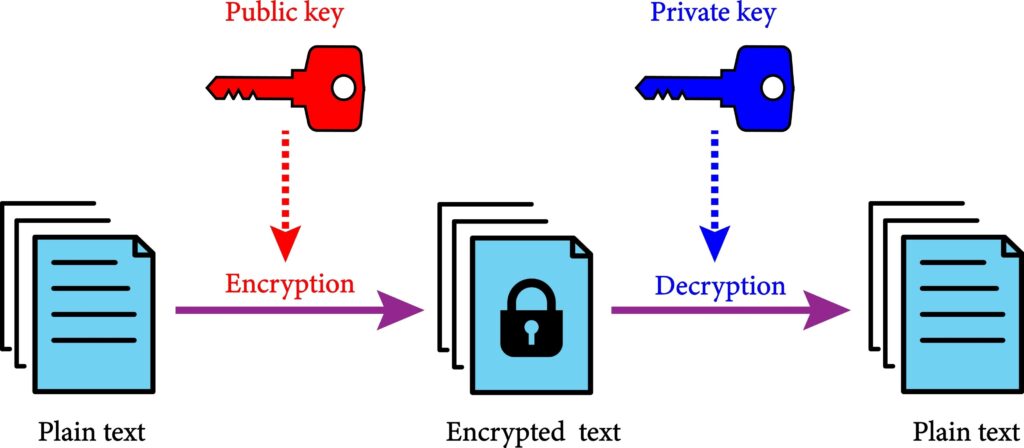
  • Public Key → Shared with others
  • Private Key → Stored securely on your device

These keys are mathematically linked but cannot be reversed.

Why This Matters:

  • Anyone can use your public key to encrypt a message
  • Only your private key can decrypt it

This creates a secure one-way system


Step 2: Secure Key Exchange (The Hidden Magic)

When you start a conversation, your app:

  1. Fetches the recipient’s public key
  2. Uses cryptographic protocols to establish a shared secret

This happens instantly and invisibly.

Behind the scenes, protocols like:

  • Diffie-Hellman key exchange
  • Double Ratchet algorithm

are often used.


Step 3: Message Encryption (Before It Leaves Your Device)

When you hit send:

  • Your message is converted into ciphertext
  • Encryption happens locally on your device
  • The original message is never sent in readable form

This is critical:
➡️ The internet never sees your real message


Step 4: Transmission (Across the Internet)

Your encrypted message travels through:

  • Routers
  • Servers
  • Data centers

Even if intercepted, it looks like:

XJ92KDL!@#8sdfLKSJ…

Completely useless without the key.


Step 5: Decryption (Only at the Destination)

When the message reaches the recipient:

  • Their private key decrypts it
  • The message becomes readable again

No one else has access to that private key.


Public Key vs Private Key (Fully Explained with Intuition)

Public Key (The Open Lock)

Your public key is like a lock you give to the world.

Anyone can:

  • Use it
  • Encrypt messages for you

But they cannot unlock anything with it.


Private Key (The Only Key That Matters)

Your private key:

  • Never leaves your device
  • Is used to decrypt messages
  • Must stay secret at all times

If someone gets your private key:
➡️ They can read your messages


How They Work Together (Simple Flow)

  1. Sender uses your public key
  2. Message becomes encrypted
  3. Only your private key can decrypt it

This system is called asymmetric encryption


7 Simple Examples of End-to-End Encryption (Real-World Scenarios)

1. Sending a WhatsApp Message

When you send a message:

  • It’s encrypted instantly
  • Even WhatsApp cannot read it
  • Only the recipient can

2. Using Signal for Private Chats

Apps like Signal take E2EE further by:

  • Minimizing metadata
  • Using open-source encryption

3. Sharing a Password Securely

Password managers use E2EE so:

  • Even the company can’t see your passwords

4. Sending Photos Privately

Images are encrypted the same way as text.

Even if intercepted:
➡️ They cannot be viewed


5. Encrypted Video Calls

Your voice and video are:

  • Encrypted in real time
  • Decrypted only by the recipient

6. Secure File Sharing

Some tools allow:

  • Uploading encrypted files
  • Sharing access only with specific users

7. Backup Encryption

Some services encrypt backups so:

  • Only you can restore them

Symmetric vs Asymmetric Encryption (Why Both Are Used)

Symmetric Encryption (Fast but Limited)

  • Uses one key
  • Very fast
  • Used for large data

Problem:
➡️ How do you share the key securely?


Asymmetric Encryption (Secure but Slower)

  • Uses public/private keys
  • Solves key sharing problem
  • Slower than symmetric encryption

Why Modern Systems Combine Both

Here’s the trick:

  1. Use asymmetric encryption to exchange a key
  2. Use symmetric encryption for the actual data

This gives:

  • Speed
  • Security

End-to-End Encryption vs Regular Encryption

FeatureRegular EncryptionEnd-to-End Encryption
Data readable on serverYesNo
Who can access dataService + userOnly users
Risk levelMediumVery low
Trust requiredHighMinimal

Advantages of End-to-End Encryption (Expanded)

1. True Privacy

No third party can access your content.


2. Protection from Data Breaches

Even if servers are hacked:
➡️ Data remains unreadable


3. Reduced Trust Dependency

You don’t need to trust companies with your data.


4. Strong Security by Design

Security is built into the system—not added later.


Limitations of End-to-End Encryption (Honest View)

1. Metadata Still Exists

Even with E2EE, some data may be visible:

  • Who you talk to
  • When you talk
  • How often

2. Device Security Is Critical

If your device is compromised:
➡️ Encryption won’t help


3. Key Management Problems

Lose your private key:
➡️ You lose access to your data


4. Not Fully Anonymous

E2EE protects content—not identity.


FAQs (Expanded Section)

1. What does end-to-end encryption mean in simple terms?

It means only the sender and receiver can read the message.


2. Can companies see encrypted messages?

No, not if true end-to-end encryption is used.


3. Is end-to-end encryption hackable?

Breaking encryption is extremely difficult. Most attacks target devices instead.


4. Does E2EE protect against all threats?

No—it protects data in transit, not compromised devices.


5. Why don’t all apps use end-to-end encryption?

Because it limits data access, analytics, and monetization.


6. Is end-to-end encryption used in banking?

Yes, often combined with other security layers.


Conclusion (Strong Wrap-Up)

End-to-end encryption is one of the most important technologies behind modern internet privacy. It ensures that your data remains private, secure, and accessible only to the people you choose.

Understanding how end-to-end encryption works helps you:

  • Choose safer apps
  • Protect your data
  • Make informed decisions online

In a world where data is constantly moving, E2EE acts as your digital shield.

The Hidden Layer: Session Keys

When you send a message, your app doesn’t just use your public/private key directly.

Instead, it creates something called a session key.

What is a Session Key?

A session key is:

  • A temporary encryption key
  • Used only for a short time (or even one message)
  • Extremely fast and efficient

Why Session Keys Exist

Using public/private keys alone would be:

  • Too slow
  • Too heavy for real-time messaging

So modern systems do this:

  1. Use asymmetric encryption to securely share a session key
  2. Use symmetric encryption (session key) to encrypt the message

This gives you:
✔ Speed
✔ Security
✔ Efficiency


A Simple Flow (Putting It Together)

Here’s what really happens when you send a message:

  1. Your app generates a session key
  2. It encrypts the message using that session key
  3. It encrypts the session key using the recipient’s public key
  4. Both are sent together
  5. The recipient:
    • Uses their private key to unlock the session key
    • Uses the session key to decrypt the message

This layered approach is what makes E2EE both fast and secure.


Forward Secrecy (Why Old Messages Stay Safe)

This is one of the most important concepts—and one most articles skip.


What Is Forward Secrecy?

Forward secrecy means:

➡️ Even if someone gets your keys today, they cannot decrypt your old messages


How This Works

Instead of using the same keys forever:

  • New keys are generated constantly
  • Often for every message or session

So:

  • Each message is independently protected
  • Breaking one message doesn’t break others

Why This Matters (Real Example)

Imagine a hacker gets access to your device today.

Without forward secrecy:

  • They could decrypt all past messages

With forward secrecy:

  • They can only access future messages (if at all)

Your history stays protected.


The Double Ratchet Algorithm (Explained Simply)

This sounds complicated—but we’ll keep it simple.


What Is the Double Ratchet?

It’s a system used by apps like Signal that:

  • Constantly updates encryption keys
  • Makes every message more secure than the last

Why It’s Called “Double Ratchet”

Think of a ratchet like a gear that only moves forward.

This system uses two ratchets:

  1. One for sending messages
  2. One for receiving messages

Each message:

  • Advances the ratchet
  • Creates a new key

Why This Is Powerful

  • Keys are never reused
  • Messages cannot be retroactively decrypted
  • Even partial compromises don’t break the system

What Happens If Someone Tries to Intercept Your Message?

Let’s walk through a real attack scenario.


Scenario: Man-in-the-Middle Attack

A hacker tries to intercept your message between you and the recipient.


Without End-to-End Encryption

The attacker can:

  • Read the message
  • Modify it
  • Forward it

With End-to-End Encryption

The attacker sees:

  • Encrypted data only
  • No usable information

Even if they try to alter the message:
➡️ It fails integrity checks and gets rejected


Why This Works

Because:

  • The attacker doesn’t have the private key
  • They cannot decrypt or re-encrypt properly

Message Integrity (How You Know It Wasn’t Changed)

Encryption isn’t just about secrecy—it’s also about trust.


What Is Message Integrity?

It ensures that:
➡️ The message you receive is exactly what was sent


How It Works

Each message includes:

  • A cryptographic signature or hash

If anything changes:

  • The hash no longer matches
  • The message is rejected

Why This Matters

It protects against:

  • Tampering
  • Fake messages
  • Data corruption

Authentication (How You Know Who You’re Talking To)

Encryption alone isn’t enough—you also need identity verification.


The Problem

What if someone pretends to be your contact?


The Solution: Key Verification

Apps solve this by:

  • Linking keys to identities
  • Allowing users to verify fingerprints

Example

In secure apps, you can:

  • Compare security codes
  • Scan QR codes

This ensures:
➡️ You are talking to the real person


End-to-End Encryption vs HTTPS vs VPN (Clear Comparison)

This is critical for your cluster because it connects your articles together.


End-to-End Encryption

  • Protects message content
  • Only sender and receiver can read it

HTTPS (Transport Encryption)

  • Protects data between you and a server
  • The server can still read the data

VPN

  • Hides your internet traffic from your ISP
  • Does NOT encrypt data end-to-end

Comparison Table

FeatureE2EEHTTPSVPN
Protects content from service✅❌❌
Protects data in transit✅✅✅
Hides activity from ISP❌❌✅
Prevents server access✅❌❌

Common Misconceptions About End-to-End Encryption

Myth 1: “Encryption makes you anonymous”

Not true.

E2EE protects:

  • Content

But not always:

  • Identity
  • Metadata

Myth 2: “Encrypted apps are 100% safe”

Also not true.

If your device is compromised:
➡️ Messages can still be accessed


Myth 3: “Only criminals use encryption”

Completely false.

Encryption is used by:

  • Businesses
  • Governments
  • Banks
  • Everyday users

Where End-to-End Encryption Is Used Today (Expanded)

1. Messaging Apps

Used in:

  • Private chats
  • Group conversations
  • Voice/video calls

2. Cloud Storage (Advanced Use Cases)

Some platforms offer:

  • Client-side encryption
  • Zero-knowledge storage

Meaning:
➡️ Even the provider cannot access your files


3. Password Managers

Your vault is:

  • Encrypted locally
  • Only unlocked with your master password

4. Secure Collaboration Tools

Used by:

  • Remote teams
  • Enterprises
  • Developers

The Future of End-to-End Encryption

Trend 1: Default Encryption Everywhere

More apps are making E2EE the default—not optional.


Trend 2: Zero-Knowledge Systems

Services are moving toward:
➡️ Knowing nothing about user data


Trend 3: Post-Quantum Encryption

Future systems will protect against:

  • Quantum computer attacks

FAQs (Extended Section)

7. Does end-to-end encryption slow down apps?

Not significantly. Modern systems are optimized for speed.


8. Can governments bypass end-to-end encryption?

Not directly. They usually rely on device access instead.


9. What is the difference between encryption and hashing?

Encryption can be reversed (with a key). Hashing cannot.


10. Is email end-to-end encrypted by default?

No, most email services do not use E2EE by default.


11. Can encrypted messages be recovered?

Only if you have the correct keys or backups.


12. Why is key management so important?

Because losing keys means losing access permanently.


Conclusion (Extended Final Thoughts)

End-to-end encryption is not just a feature—it’s a fundamental shift in how digital privacy works.

It removes the need to trust:

  • Platforms
  • Servers
  • Networks

And replaces it with:
➡️ Mathematical certainty

By understanding how end-to-end encryption works, you gain more than knowledge—you gain control over your digital life.


Real-World Attack Scenarios (And How End-to-End Encryption Stops Them)

To truly understand how end-to-end encryption works, you need to see what it protects against in the real world.


1. Public Wi-Fi Attack (Coffee Shop Scenario)

The Risk

You connect to public Wi-Fi at a café. A hacker on the same network tries to intercept your data.

Without encryption:

  • They can see your messages
  • They can steal login details
  • They can track your activity

With End-to-End Encryption

Even if the attacker captures your data:

  • It’s fully encrypted
  • It looks like random noise
  • It cannot be decoded

➡️ Your message stays private


2. Compromised Server Attack

The Risk

A company’s servers get hacked.

Without E2EE:

  • Hackers can access stored messages
  • Entire databases can be leaked

With End-to-End Encryption

Servers only store:

  • Encrypted data

They do NOT have:

  • The keys to decrypt it

➡️ Even a full breach reveals nothing useful


3. Government Surveillance Scenario

The Risk

Authorities request access to user data from a company.


With Standard Encryption

Companies may:

  • Decrypt and provide data

With End-to-End Encryption

Companies can only provide:

  • Encrypted data

They cannot decrypt it, even if required.


4. Data Interception During Transmission

The Risk

Data travels across multiple networks:

  • ISPs
  • Routers
  • International servers

Each point is a potential interception spot.


With End-to-End Encryption

Every intercepted packet is:

  • Encrypted
  • Useless

Visualizing End-to-End Encryption (Mental Models That Stick)

Understanding E2EE becomes easier with the right mental models.


Model 1: The Locked Box Chain

  • You lock a box with a unique key
  • Only the receiver has the matching key
  • The box passes through many hands

No one else can open it.


Model 2: Changing Locks Every Time

Imagine:

  • Every message uses a new lock
  • Old locks are destroyed

Even if someone finds a key later:
➡️ It won’t work on past messages


Model 3: Secret Language That Changes Constantly

You and your friend:

  • Speak in a coded language
  • Change the code after every sentence

No outsider can keep up.


Deep Dive: What Happens Inside Your Device

Most people think encryption happens “on the internet.”

It doesn’t.


Everything Starts on Your Device

Your phone or computer:

  • Generates keys
  • Encrypts messages
  • Decrypts messages

The internet only carries:
➡️ Encrypted data


Secure Storage of Keys

Private keys are stored in:

  • Secure enclaves
  • Protected memory areas

Modern devices isolate these keys so:
➡️ Even apps can’t access them directly


Why Device Security Matters So Much

If someone:

  • Installs malware
  • Gains physical access

They could:

  • Read messages before encryption
  • Read messages after decryption

➡️ Encryption cannot protect against this


End-to-End Encryption in Group Chats (More Complex Than You Think)

Group chats introduce new challenges.


The Problem

Instead of 1-to-1 communication:

  • You now have multiple participants
  • Each needs secure access

How It Works

For each participant:

  • Messages are encrypted separately
  • Each user has their own key

So if there are 5 people:
➡️ The message may be encrypted 5 times


What Happens When Someone Joins or Leaves

  • New keys are generated
  • Old keys are discarded

This ensures:
➡️ Past messages remain secure


Metadata: The One Thing Encryption Doesn’t Fully Hide

Even with E2EE, some data can still be visible.


What Is Metadata?

Metadata is information about communication, such as:

  • Who you talk to
  • When you send messages
  • How often you communicate

Why It Matters

Even without message content, metadata can reveal:

  • Relationships
  • Behavior patterns
  • Activity timelines

How Apps Reduce Metadata

Privacy-focused apps try to:

  • Minimize stored metadata
  • Use techniques like “sealed sender”

But complete elimination is difficult.


Key Management (The Most Overlooked Challenge)

Encryption is only as strong as how keys are handled.


Why Keys Are Everything

Keys control:

  • Access to messages
  • Ability to decrypt data

Lose your key:
➡️ You lose access permanently


Common Key Management Methods

1. Device-Based Storage

Keys stay on your device.

Pros:

  • Maximum privacy

Cons:

  • Risk of loss

2. Backup Systems

Some services allow:

  • Encrypted backups
  • Recovery using passwords

3. Multi-Device Sync

Keys are securely shared across:

  • Phones
  • Laptops
  • Tablets

What Happens When You Switch Devices?

This is a real-world situation many users don’t think about.


The Challenge

Your encryption keys are tied to your device.

When you switch devices:

  • You need to transfer or regenerate keys

Secure Migration Process

Apps may:

  • Verify identity
  • Transfer keys securely
  • Re-establish encrypted sessions

Potential Risks

If not handled properly:

  • Messages could become inaccessible
  • Security could be weakened

End-to-End Encryption vs Zero Trust Security (High-Level Connection)

This ties into another article in your cluster.


End-to-End Encryption Focus

  • Protects data in transit
  • Ensures only endpoints can read it

Zero Trust Security Focus

  • Assumes no system is trusted
  • Verifies everything continuously

How They Work Together

E2EE is often part of a zero-trust model:

  • Data is always encrypted
  • Access is always verified

Why Some Companies Avoid Full End-to-End Encryption

This is an important (and often hidden) reality.


1. Loss of Data Access

With E2EE:

  • Companies cannot read user data

This affects:

  • Analytics
  • Personalization
  • Advertising

2. Moderation Challenges

Platforms cannot:

  • Easily detect harmful content
  • Monitor conversations

3. Complexity and Cost

Implementing E2EE requires:

  • Advanced cryptography
  • Secure infrastructure
  • Ongoing maintenance

The Role of Open Source in Encryption Trust

Trust is critical in encryption.


Why Open Source Matters

Open-source encryption:

  • Can be inspected by experts
  • Can be verified publicly

This reduces the risk of:

  • Hidden backdoors
  • Weak implementations

Closed Source Concerns

With closed systems:

  • You must trust the company
  • You cannot verify the code

Advanced Concept: Perfect Forward Secrecy vs Standard Encryption

Let’s go one level deeper.


Standard Encryption

  • Uses long-term keys
  • If compromised, past data may be exposed

Perfect Forward Secrecy

  • Uses temporary keys
  • Keys are constantly rotated

Result:
➡️ Past communication remains safe

Extended FAQs (Final Additions)

13. Can end-to-end encryption be turned off?

Yes, depending on the app—but many apps enable it by default.


14. Does E2EE protect cloud backups?

Not always—some backups are not end-to-end encrypted.


15. Is E2EE used in video calls?

Yes, many apps use it for real-time communication.


16. What is “zero-knowledge encryption”?

It means the provider knows nothing about your data.


17. Can encrypted data be brute-forced?

In theory yes, but modern encryption makes it practically impossible.


18. Why is encryption important for businesses?

It protects:

  • Customer data
  • Intellectual property
  • Internal communication

Final Conclusion (Ultimate Wrap-Up)

End-to-end encryption is one of the most powerful technologies shaping the modern internet.

It transforms security from:

  • Trust-based → math-based

It ensures that:

  • Your data belongs to you
  • Your conversations stay private
  • Your digital life is protected

In a world where data is constantly moving and threats are always evolving, understanding how end-to-end encryption works is no longer optional—it’s essential.


What Is a CDN and How It Works (Edge Servers, Caching, and Global Content Delivery)

What Is a CDN and How It Works

What is a CDN and how it works is a core concept in modern internet infrastructure. A CDN, or Content Delivery Network, is not just a performance optimization tool — it is a distributed system that fundamentally changes how data flows across the internet.

To understand what is a CDN and how it works, you must move beyond the idea of “faster loading” and examine how content is physically distributed, cached, routed, and served across multiple geographic locations. CDNs sit between users and origin servers and act as an intelligent delivery layer that optimizes both latency and system load.

At a systems level, a CDN is responsible for:

  • reducing physical distance between users and content
  • distributing requests across multiple servers
  • caching frequently accessed data
  • absorbing traffic spikes
  • protecting origin infrastructure

Within the Internet Architecture, CDNs represent a critical layer that connects servers, networks, and users through optimized delivery paths.

What Is a CDN and How It Works: Clear System Definition

A CDN (Content Delivery Network) is a distributed network of servers designed to deliver content efficiently by caching and serving it from locations closer to users.

Instead of a direct model:

User → Origin Server

A CDN introduces a distributed layer:

User → Edge Server → Origin Server (only if needed)

Key system properties:

  • distributed infrastructure
  • cache-based delivery
  • proximity-based routing
  • request interception
  • fallback to origin

A CDN does not replace servers. It augments them.


Where CDNs Exist in the Internet Stack

To fully understand what is a CDN and how it works, you need to place it inside the internet request lifecycle.

A simplified request path looks like:

User → ISP → DNS → CDN → Origin Server → CDN → User

CDNs operate between DNS resolution and origin response delivery.

They are tightly connected to:

  • Domain Name System
  • routing systems
  • TCP/IP communication
  • HTTP/HTTPS layers

How CDNs Fit Into the Full Internet Request Lifecycle

To fully understand what is a CDN and how it works, it must be placed inside the complete request lifecycle of the internet. A CDN is not an isolated system — it is one stage in a multi-step process that includes DNS resolution, routing, protocol negotiation, and data transfer.

A simplified but realistic request lifecycle looks like this:

User → Browser → DNS → CDN → Edge Server → (optional) Origin → CDN → User

Each step involves different subsystems:

StageSystem
DNS resolutionDomain Name System
RoutingInternet backbone / ISPs
Delivery optimizationCDN
Content sourceOrigin server
TransportTCP/IP
SecurityHTTPS / TLS

The CDN sits between DNS resolution and content delivery. It intercepts the request before it reaches the origin and determines whether the content can be served locally.

This placement allows the CDN to:

  • reduce distance between user and data
  • cache reusable content
  • optimize routing paths
  • absorb repeated requests

Without CDNs, every request would travel to the origin, increasing latency and infrastructure load.


Why CDNs Exist: The Core Problem

Without CDNs, the internet would rely heavily on centralized infrastructure.

Problem 1: Physical Distance

Data must travel across continents.

Example:

User (Romania) → Server (USA)

This introduces:

  • high latency
  • slower response times
  • more network hops

Problem 2: Server Load

A single origin server must handle:

  • all users
  • all requests
  • all traffic spikes

This creates bottlenecks.


Problem 3: Scalability Limits

High traffic events:

  • viral content
  • product launches
  • live streams

can overwhelm origin infrastructure.


Problem 4: Reliability

If the origin server fails:

  • the entire service becomes unavailable

How CDNs Solve These Problems

CDNs solve these issues using three core strategies:

  1. Geographic distribution
  2. Caching
  3. Intelligent routing

Instead of one server, the system becomes:

Many edge servers → distributed globally

Core Architecture of a CDN

A CDN consists of multiple components.


1. Origin Server

The origin server is the source of truth.

It stores:

  • website content
  • images
  • videos
  • API responses

The CDN retrieves data from the origin when needed.


2. Edge Servers

Edge servers are located close to users.

They:

  • cache content
  • serve requests
  • reduce latency

3. PoPs (Points of Presence)

A PoP is a physical location containing multiple edge servers.

Example:

  • Frankfurt
  • Paris
  • Bucharest
  • New York
  • Tokyo

Each PoP serves nearby users.


4. Caching Layer

The caching layer determines:

  • what is stored
  • how long it is stored
  • when it is refreshed

5. Routing Layer

Routing determines:

  • which edge server handles a request
  • how traffic is distributed

Deep Dive: How a CDN Works Step-by-Step


Step 1: User Initiates Request

User opens:

https://example.com/image.jpg

Step 2: DNS Resolution

DNS determines where to send the request.

Instead of returning origin IP:

  • it returns a CDN endpoint

👉 Internal link:
What Is DNS and How It Works


Step 3: CDN Selects Edge Location

CDN selects best edge server based on:

  • user location
  • latency
  • server load
  • network conditions

Step 4: Cache Lookup

Edge server checks:

Is content cached?

Step 5A: Cache Hit

If YES:

  • content served immediately
  • fastest possible response

Step 5B: Cache Miss

If NO:

  1. edge → origin request
  2. origin responds
  3. edge caches content
  4. edge returns response

Step 6: Response Delivered

User receives data from nearest server.

Full Request Trace Example (Realistic Scenario)

To better understand what is a CDN and how it works, consider a realistic request trace from a user in Europe accessing a website hosted in the United States.

Scenario

  • User location: Romania
  • Origin server: US (Virginia)
  • CDN edge: Frankfurt

Step-by-step flow:

  1. User enters URL in browser
  2. Browser sends DNS request
  3. DNS returns CDN IP instead of origin
  4. Request routed to Frankfurt edge server
  5. Edge server checks cache

Case A: Cache Hit

  • Content served immediately
  • Total latency: low

Case B: Cache Miss

  • Edge requests content from US origin
  • Origin responds
  • Edge caches content
  • Content returned to user

Key Observations

  • The user never directly communicates with the origin server
  • The CDN reduces transatlantic data transfer
  • Future users benefit from cached content
  • The system becomes faster over time

This example highlights that CDNs are dynamic systems that adapt based on request patterns.


CDN Caching System (Deep Explanation)

Caching is not just storage — it is a controlled system.


Cache Control Rules

Defined by headers:

  • Cache-Control
  • Expires
  • ETag

TTL (Time To Live)

Defines how long content stays cached.

Example:

ContentTTL
imageslong
HTMLshort
APIdynamic

Cache Invalidation

When content changes:

  • cache must be cleared or refreshed

Methods:

  • purge
  • versioning
  • revalidation

Advanced Cache Invalidation Strategies

One of the most complex aspects of what is a CDN and how it works is cache invalidation.

Caching improves performance, but it introduces a risk: stale content.

If the origin content changes but the CDN continues to serve cached data, users may receive outdated information.


Common Invalidation Strategies

1. Time-Based Expiration (TTL)

Content expires automatically after a set time.

Pros:

  • simple
    Cons:
  • not real-time

2. Manual Purge

Developers explicitly clear cache.

Pros:

  • immediate update
    Cons:
  • operational overhead

3. Versioned URLs

Example:

style.css?v=2

New version = new cache entry.

Pros:

  • safe and predictable
    Cons:
  • requires asset management

4. Revalidation (ETag / If-Modified-Since)

CDN checks if content changed before serving.


Why This Matters

Cache invalidation is often described as one of the hardest problems in distributed systems because it requires balancing:

  • freshness
  • performance
  • consistency

CDNs must ensure users get updated content without sacrificing speed.


CDN Routing Algorithms

CDNs use routing logic similar to network systems.


Types of Routing

Geo-based routing

Closest server by location.


Latency-based routing

Fastest response time.


Load-based routing

Least busy server.


Anycast routing

Multiple servers share same IP.

Traffic automatically routed to nearest.

CDN vs Load Balancer vs Reverse Proxy

To fully understand what is a CDN and how it works, it is important to distinguish it from similar infrastructure components.


CDN

  • global distribution
  • caching
  • edge delivery

Load Balancer

  • distributes traffic between servers
  • operates within a data center or region

Reverse Proxy

  • sits in front of origin servers
  • handles requests before forwarding

Comparison Table

SystemScopeFunction
CDNglobalcaching + delivery
Load balancerlocal/regionaltraffic distribution
Reverse proxyserver-levelrequest forwarding

CDNs often include reverse proxy behavior, but not all reverse proxies are CDNs.


CDN and Data Flow

CDNs optimize Data Flow.

Instead of:

centralized → long path → slow

CDNs create:

distributed → short path → fast

CDN and HTTPS

CDNs terminate or pass through HTTPS connections.

They handle:

  • TLS handshake
  • encryption
  • certificate management

CDN and VPN Interaction

CDNs and VPNs operate differently:

CDNVPN
optimizes deliveryreroutes traffic
reduces latencymay increase latency
caches contentencrypts traffic

👉 Internal link:
How VPNs Work


CDN and Cloud Infrastructure

CDNs integrate with cloud platforms.

Examples:

  • AWS CloudFront
  • Google Cloud CDN
  • Azure CDN

External reference:
https://www.cloudflare.com/learning/cdn/what-is-a-cdn/

Multi-CDN Architecture

Large platforms often use multiple CDNs simultaneously.

This is called a multi-CDN strategy.


Why use multiple CDNs?

  • redundancy
  • performance optimization
  • cost control
  • regional optimization

How it works

Traffic is dynamically routed between CDNs based on:

  • latency
  • availability
  • performance metrics

Example Flow

User → Traffic Manager → CDN A or CDN B → Origin

Benefits

  • higher availability
  • better global performance
  • reduced dependency on a single provider

CDN Use Cases (Expanded)


1. Static Websites

Serve:

  • images
  • CSS
  • JS

2. Video Streaming

CDNs:

  • segment video
  • distribute globally
  • reduce buffering

3. APIs

CDNs can cache:

  • responses
  • headers

4. E-commerce

Improve:

  • page load speed
  • checkout reliability

5. Gaming

Deliver:

  • patches
  • updates
  • assets

Advanced CDN Concepts


Edge Computing

CDNs can execute logic at edge:

  • authentication
  • personalization
  • request filtering

Dynamic Content Acceleration

Even non-cacheable content can be optimized via:

  • TCP optimization
  • compression
  • connection reuse

Content Compression

CDNs compress data:

  • Gzip
  • Brotli

CDN Security Layer

CDNs provide:

  • DDoS protection
  • rate limiting
  • bot detection
  • firewall rules

They act as a protective shield.


CDN Performance Metrics

Key metrics:

  • latency
  • cache hit ratio
  • time to first byte (TTFB)
  • throughput

Common Misconceptions


“CDN = hosting”

False.


“CDN stores everything”

False.


“CDN is only for big websites”

False.


What Is a CDN and How It Works: FAQ


What is a CDN in simple terms?

A distributed system that delivers content from nearby servers.


Does a CDN replace hosting?

No.


Why is CDN important?

It improves speed, scalability, and reliability.

CDN Tradeoffs and System Design Constraints

While CDNs improve performance, they introduce tradeoffs.


1. Consistency vs Performance

Caching improves speed but may serve outdated content.


2. Complexity

CDNs add layers:

  • caching rules
  • routing logic
  • invalidation strategies

3. Cost

CDNs are not free.

Costs depend on:

  • bandwidth
  • requests
  • regions

4. Debugging Difficulty

Issues may arise at:

  • edge server
  • origin
  • DNS
  • routing layer

This makes debugging more complex.


5. Not All Content Can Be Cached

Dynamic content often requires origin processing.


CDNs must balance:

  • performance
  • accuracy
  • cost
  • reliability

What Is a CDN and How It Works: Conclusion

What is a CDN and how it works is best understood as a distributed content delivery system that reduces latency, balances load, and improves reliability by caching and serving content from geographically distributed edge servers.

CDNs are not optional optimizations anymore — they are fundamental infrastructure that enable the modern internet to scale efficiently.

What Is DNS and How It Works (Domain Name System Explained From Root to Resolution)

Understanding what is DNS and how it works is essential to understanding how the internet functions at all.

Every time you type a website name into your browser, send an email, or open an app, DNS is the first system that must respond before anything else can happen.

This guide explains what DNS is and how it works from the ground up — covering domain names, root servers, resolvers, caching, performance, security, and why DNS is one of the most critical pieces of global internet infrastructure.

DNS Is the Internet’s Phone Book — But Smarter

Every time you visit a website, send an email, or open an app, one system quietly runs first.

Before data can move, before servers can respond, before anything loads, DNS must work.

DNS — the Domain Name System — is what allows humans to use names like:

  • google.com
  • netflix.com
  • example.org

Instead of raw numerical IP addresses.

Without DNS:

  • The internet would still function
  • But only for machines
  • And only for people willing to memorize numbers

DNS is not just a convenience layer.
It is core internet infrastructure.

This article explains DNS from first principles:

  • What DNS actually is
  • Why it exists
  • How resolution works step by step
  • Where performance and failures come from
  • How modern DNS scales globally
  • Why DNS is also a security boundary


What DNS Actually Is

At its core, DNS is a distributed, hierarchical naming system.

It answers one fundamental question:

“Given a human-readable name, what network address does it map to right now?”

DNS maps:

  • Domain names → IP addresses
  • Services → locations
  • Human intent → machine routing

It does this without central control, at global scale.


DNS Is Not a Database

A common misconception is that DNS is a single global database.

It is not.

Instead, DNS is:

  • Distributed across many servers
  • Delegated by hierarchy
  • Cached aggressively
  • Updated continuously

No single system “knows” all DNS answers.


DNS Is a Translation System

DNS does not deliver content.
It does not route packets.
It does not host websites.

DNS only tells you where to go next.

Everything else depends on that answer.

Why DNS Exists

To understand DNS, you need to understand the problem it solves.


Machines Prefer Numbers

Networks route data using IP addresses.

An IP address:

  • Identifies a device or service
  • Is efficient for machines
  • Is terrible for humans

Example:

  • 142.250.190.14 means nothing to most people

Humans Prefer Names

Humans think in:

  • Brands
  • Words
  • Meaningful labels

DNS bridges this gap by allowing:

  • Stable names
  • Changing addresses
  • Decoupling identity from location

This decoupling is critical.


Why Hardcoding Addresses Doesn’t Work

Without DNS:

  • Changing servers would break links
  • Load balancing would be impossible
  • Failover would be manual
  • Global scale would collapse

DNS enables flexibility at internet scale.


Domain Names Explained

A domain name is a structured identifier.

Example:

www.example.com

Each part has meaning.

Reading a Domain Name Right to Left

Domains are read from right to left, not left to right.

www → subdomain example → domain .com → top-level domain (TLD)

The rightmost part is the highest level.

This hierarchy is the backbone of DNS.

Why This Hierarchy Matters

Hierarchy allows:

  • Delegation of control
  • Distributed responsibility
  • Independent administration

No single entity owns all domains.


The DNS Hierarchy: Who Answers What

DNS resolution works by walking down the hierarchy, not up.

There are four major levels.


1. Root Level

At the top is the DNS root.

The root:

  • Knows where TLDs are
  • Does not know individual domains
  • Is extremely stable

There are only 13 logical root server identities, distributed globally.


2. Top-Level Domains (TLDs)

TLDs include:

  • .com
  • .org
  • .net
  • .io
  • Country codes like .uk, .de

TLD servers:

  • Know where domains are registered
  • Do not know subdomains

3. Authoritative Name Servers

These servers:

  • Are responsible for a specific domain
  • Contain the actual DNS records
  • Provide definitive answers

This is where truth lives.


4. Recursive Resolvers

Resolvers:

  • Perform lookups on behalf of users
  • Cache results
  • Speed up future queries

Your ISP or device typically uses a resolver.

What Is DNS and How It Works DNS Resolution: Step-by-Step

Let’s walk through what happens when you type:

example.com

Step 1: Local Cache Check

Before asking the internet, your device checks:

  • Browser cache
  • OS cache
  • Local DNS cache

If found, resolution stops here.


Step 2: Recursive Resolver Query

If not cached, your device asks a recursive resolver:

“Do you know the IP for example.com?”

If the resolver knows, it answers immediately.


Step 3: Root Server Query

If not, the resolver asks a root server:

“Who handles .com?”

The root replies with:

“Ask these .com servers.”


Step 4: TLD Server Query

The resolver asks a .com server:

“Who handles example.com?”

The TLD replies with:

“Ask these authoritative servers.”


Step 5: Authoritative Server Query

The resolver asks:

“What is the IP for example.com?”

The authoritative server replies with the answer.


Step 6: Caching and Return

The resolver:

  • Caches the answer
  • Returns it to your device

Only then does your browser connect to the server.

What Is DNS and How It Works DNS Records: What DNS Actually Stores

DNS doesn’t store “websites.”
It stores records.

Each record answers a specific question.


A Records and AAAA Records

  • A → IPv4 address
  • AAAA → IPv6 address

These map names to IPs.


CNAME Records

CNAME means:

“This name is an alias for another name.”

Used for:

  • Load balancing
  • Service abstraction
  • Infrastructure flexibility

MX Records

MX records specify:

  • Mail servers
  • Email routing priority

Without MX records, email doesn’t work.


TXT Records

TXT records store:

  • Verification data
  • Security policies
  • Metadata

They are heavily used in modern security systems.

What Is DNS and How It Works Caching: Why DNS Is Fast

DNS would be unusably slow without caching.

Caching happens at:

  • Browser level
  • OS level
  • Resolver level
  • ISP level

TTL (Time To Live)

Every DNS record includes a TTL.

TTL controls:

  • How long a result is cached
  • How quickly changes propagate
  • The trade-off between freshness and performance

Low TTL:

  • Faster updates
  • More queries

High TTL:

  • Better performance
  • Slower changes

Why DNS Failures Are So Disruptive

When DNS fails:

  • Websites appear offline
  • Apps stop working
  • Services seem “down”

Even when servers are fine.

DNS is a single dependency with global impact.

What Is DNS and How It Works DNS Performance: Why Resolution Is Usually Fast

At first glance, DNS resolution looks slow.

One lookup appears to involve:

  • Multiple servers
  • Multiple round trips
  • Global communication

Yet in practice, DNS lookups usually take milliseconds.

That speed comes from aggressive caching and smart distribution.


Where DNS Caching Happens

DNS answers are cached at many layers:

  1. Browser cache
  2. Operating system cache
  3. Local network cache (router)
  4. Recursive resolver cache
  5. ISP cache

Most DNS queries never leave your local network.

DNS requests are also important in secure networking systems such as VPN connections, where DNS traffic may be routed through encrypted tunnels.


Why Most DNS Queries Never Reach Root Servers

Root servers only see a tiny fraction of total DNS traffic.

This is because:

  • TLD answers are cached
  • Authoritative answers are cached
  • Resolvers reuse answers across many users

The hierarchy is designed to push load downward, not upward.


Cold vs Warm DNS Lookups

  • Cold lookup: Nothing cached → full resolution path
  • Warm lookup: Cached answer → instant response

Most user experiences rely on warm lookups.

What Is DNS and How It Works Latency in DNS: What Actually Slows It Down

When DNS feels slow, it’s rarely because of DNS itself.

Common causes include:

  • Poorly located resolvers
  • Network congestion
  • High-latency last-mile connections
  • Misconfigured TTL values

DNS adds overhead — but it’s usually not the bottleneck.


Why Distance Still Matters

DNS resolution involves round trips.

Physical distance affects:

  • Time to root servers
  • Time to authoritative servers
  • Time to resolvers

This is why global DNS infrastructure focuses heavily on geographic distribution.


What Is DNS and How It Works Anycast: How DNS Scales Globally

One of the most important — and least understood — DNS technologies is anycast.


What Anycast Is

Anycast allows:

  • Many servers
  • In many locations
  • To share the same IP address

When you query that IP:

  • The network routes you to the nearest available server
  • Based on routing topology, not geography

Why Anycast Is Perfect for DNS

DNS traffic:

  • Is read-heavy
  • Is stateless
  • Can tolerate some inconsistency

Anycast enables:

  • Low latency
  • High redundancy
  • Massive scalability

This is how a small number of logical servers handle billions of queries per day.

What Is DNS and How It Works Authoritative DNS vs Recursive DNS

It’s important to distinguish between two very different DNS roles.


Authoritative DNS Servers

These servers:

  • Hold the official records
  • Answer definitively
  • Are controlled by the domain owner

They do not cache answers from others.


Recursive DNS Resolvers

These servers:

  • Act on behalf of users
  • Perform full resolution
  • Cache results aggressively

They trade freshness for speed.


Why This Separation Matters

Separating roles:

  • Improves scalability
  • Limits blast radius
  • Enables independent optimization

DNS is resilient because no single server type does everything.


DNS and Load Balancing

DNS is often used as a traffic steering mechanism.


Simple Load Balancing

DNS can return:

  • Different IPs
  • In different orders
  • Based on location or policy

This spreads load across servers.


Geographic Routing

DNS can direct users to:

  • The nearest data center
  • The lowest-latency region
  • A region with spare capacity

This improves performance and reliability.


Limitations of DNS Load Balancing

DNS decisions are:

  • Cached
  • Slow to change
  • Blind to real-time server health

This is why DNS is often combined with:

  • CDNs
  • Load balancers
  • Health checks

What Is DNS and How It Works DNS and Content Delivery Networks (CDNs)

DNS plays a critical role in how CDNs work.


How DNS Enables CDNs

When you request content:

  1. DNS directs you to a CDN domain
  2. The CDN’s DNS system evaluates your location
  3. You receive an IP for a nearby edge node

This all happens before any content is requested.


Why DNS Is the First Decision Point

DNS decides:

  • Which network you hit
  • Which region serves you
  • Which cache layer responds

By the time HTTP begins, the path is already chosen.


DNS as an Optimization Layer

Modern DNS systems:

  • Integrate performance data
  • Adapt to network conditions
  • Shift traffic dynamically

DNS is no longer just naming — it’s traffic intelligence.

DNS Security: Why Naming Is a Target

Because DNS sits at the front of every connection, it is a high-value attack surface.


DNS Spoofing and Cache Poisoning

Attackers may try to:

  • Inject fake DNS answers
  • Redirect users to malicious servers
  • Intercept traffic

This is called DNS poisoning.

It works by exploiting trust in cached answers.


Man-in-the-Middle Attacks

If DNS is compromised:

  • Users can be redirected
  • Even if websites themselves are secure

This makes DNS a critical link in the security chain.


Why DNS Was Vulnerable Historically

DNS was designed:

  • Before widespread security threats
  • Without built-in authentication
  • With implicit trust between servers

Security had to be added later.


What Is DNS and How It Works DNSSEC: Securing DNS Answers

DNSSEC (DNS Security Extensions) addresses DNS authenticity.


What DNSSEC Does

DNSSEC allows resolvers to:

  • Verify that DNS answers are genuine
  • Detect tampering
  • Reject forged responses

It uses:

  • Cryptographic signatures
  • Chains of trust
  • Public key verification

What DNSSEC Does NOT Do

DNSSEC does not:

  • Encrypt DNS queries
  • Hide which domains you visit
  • Prevent all attacks

It ensures integrity, not privacy.

What Is DNS and How It Works DNS Privacy: Who Sees Your Queries

Traditional DNS is sent:

  • In plaintext
  • To your resolver
  • Over the network

This means DNS queries can be observed by:

  • ISPs
  • Network operators
  • Intermediaries

DNS reveals intent, even when content is encrypted.


Encrypted DNS (DoH and DoT)

Modern approaches include:

  • DNS over HTTPS (DoH)
  • DNS over TLS (DoT)

These encrypt DNS queries in transit.


Privacy Trade-Offs

Encrypted DNS:

  • Improves privacy
  • Centralizes trust
  • Shifts power to resolver providers

Privacy gains come with new dependencies.

What Is DNS and How It Works DNS and Tracking

DNS can be used for tracking and attribution.

Examples include:

  • Unique subdomains per user
  • Short-lived DNS records
  • Correlating query timing

DNS-based tracking is:

  • Indirect
  • Hard to block
  • Often invisible to users

This makes DNS both powerful and sensitive.

Operational DNS Failures

DNS failures tend to be systemic, not isolated.

Common causes:

  • Configuration errors
  • Expired domains
  • Registrar mistakes
  • Mis-set TTLs
  • DDoS attacks on DNS infrastructure

Because DNS is upstream of everything, failures propagate widely.


Why DNS Changes Feel Slow

When you change DNS:

  • Old records persist due to caching
  • Different resolvers update at different times
  • Global consistency takes time

This is not a flaw — it’s a consequence of scale.


Modern DNS Trends

DNS continues to evolve.

Key trends include:

  • More encryption by default
  • Smarter traffic steering
  • Integration with security systems
  • Edge-aware resolution
  • Greater regulatory scrutiny

Despite changes, the core model remains intact.


Mental Models for Understanding DNS

To reason clearly about DNS, keep these in mind:

  1. DNS is distributed, not centralized
  2. Caching is the reason DNS scales
  3. DNS answers “where,” not “what”
  4. Security and privacy are separate concerns
  5. DNS failures are disproportionately visible

What Is DNS and How It Works Frequently Asked Questions

Is DNS required for the internet to work?
Yes — for humans. Machines can use IPs directly, but almost no systems do.

Can DNS be bypassed?
Technically yes, practically no at scale.

Why does DNS take time to update?
Because caching is necessary for performance and resilience.

Is changing DNS servers safe?
Usually, but it changes who you trust with your queries.


What Is DNS and How It Works Conclusion: What DNS Really Does

DNS is often described as the internet’s phone book.

That analogy understates its importance.

DNS is:

  • A global coordination system
  • A performance optimization layer
  • A security boundary
  • A privacy consideration
  • A critical dependency for almost everything online

Every click begins with DNS.

When DNS works, no one notices.
When DNS fails, everything breaks.

Understanding what DNS is and how it works reveals just how much of the internet depends on one quiet, distributed system doing its job perfectly, billions of times per day.

What Is DNS and How It Works Deep Dive: DNS Failure Modes and Recovery Patterns

DNS failures are uniquely disruptive because everything depends on them. When DNS breaks, the internet appears broken—even if servers and networks are healthy.

Understanding failure patterns is the key to designing resilient DNS.


Failure Mode 1: Configuration Errors

The most common DNS outages are self-inflicted.

Examples:

  • Typo in a record
  • Incorrect IP address
  • Missing record
  • Wrong TTL value
  • Broken delegation to name servers

Why this is dangerous:

  • DNS changes propagate globally
  • Caching amplifies mistakes
  • Rollbacks are slow

Recovery strategies

  • Staged rollouts with low TTLs
  • Change validation and linting
  • Dual-provider DNS (where feasible)
  • Explicit delegation checks

Failure Mode 2: Expired Domains

When a domain expires:

  • DNS stops resolving
  • Email fails
  • Services disappear instantly

This failure is:

  • Sudden
  • Public
  • Preventable

Recovery strategies

  • Auto-renewal at registrars
  • Multiple administrative contacts
  • Domain expiration monitoring

Failure Mode 3: DNS Provider Outages

Even highly reliable DNS providers can fail.

Causes include:

  • Software bugs
  • Control plane failures
  • DDoS attacks
  • Misrouted traffic

Because DNS is centralized per domain, provider outages can be catastrophic.

Recovery strategies

  • Secondary DNS providers
  • Anycast diversification
  • Split-horizon DNS (advanced)
  • Regular failover testing

Failure Mode 4: DDoS Attacks on DNS

DNS is a common DDoS target because:

  • It’s publicly reachable
  • It’s essential
  • Small queries can amplify traffic

Recovery strategies

  • Anycast distribution
  • Rate limiting
  • Response caching
  • DDoS mitigation services

DNS in Enterprise Environments

Enterprise DNS is more complex than public DNS.

It must handle:

  • Internal services
  • Private networks
  • Split-horizon resolution
  • Security policies
  • Compliance requirements

Internal vs External DNS

Enterprises often maintain:

  • Internal DNS for private resources
  • External DNS for public-facing services

The same domain name can resolve differently depending on:

  • Network location
  • User identity
  • Security context

This is called split-horizon DNS.


Why Enterprises Rely Heavily on DNS

DNS is used for:

  • Service discovery
  • Failover
  • Microservice routing
  • Policy enforcement

In many organizations, DNS becomes a control plane, not just a naming system.


Operational Risks in Enterprise DNS

Risks include:

  • Shadow DNS changes
  • Manual configuration drift
  • Poor documentation
  • Overlapping namespaces

Enterprises mitigate this with:

  • Infrastructure-as-code
  • Change management
  • Observability and logging

DNS in Cloud Environments

Cloud computing has reshaped DNS usage.


Dynamic Infrastructure Changes

In the cloud:

  • Servers are ephemeral
  • IPs change frequently
  • Scaling happens automatically

DNS enables:

  • Stable naming
  • Service abstraction
  • Dynamic routing

Without DNS, elastic infrastructure would be unmanageable.


Service Discovery via DNS

Cloud systems often use DNS to:

  • Locate services
  • Balance load
  • Enable zero-config communication

Examples include:

  • Database endpoints
  • Internal APIs
  • Regional services

DNS becomes the glue that holds microservices together.


Private DNS Zones

Cloud providers support:

  • Private DNS zones
  • Isolated name resolution
  • Network-scoped visibility

This allows:

  • Security isolation
  • Clean internal naming
  • Reduced attack surface

Advanced DNS + CDN Interaction Patterns

DNS and CDNs work together in increasingly sophisticated ways.


Real-Time Traffic Steering

Modern DNS systems integrate:

  • Latency measurements
  • Regional health checks
  • Capacity signals

DNS responses adapt based on:

  • User location
  • Network congestion
  • Backend availability

This happens before any content is fetched.


Failover and Disaster Recovery

DNS enables:

  • Regional failover
  • Traffic draining
  • Disaster recovery routing

When a data center fails:

  • DNS redirects new traffic
  • Existing connections may degrade gracefully

DNS is the first lever in large-scale incident response.


Multi-CDN Strategies

Some organizations use:

  • Multiple CDNs
  • DNS-based traffic splitting
  • Performance-based routing

This reduces:

  • Vendor lock-in
  • Outage impact
  • Regional performance variance

DNS becomes a meta-load-balancer.

DNS Observability and Monitoring

Because DNS issues are invisible until they’re catastrophic, monitoring is essential.

Key signals include:

  • Query latency
  • Error rates
  • NXDOMAIN spikes
  • TTL behavior
  • Resolver diversity

Modern systems treat DNS as critical infrastructure, not plumbing.


DNS and Regulation

DNS increasingly intersects with policy.

Examples:

  • Domain takedowns
  • Government-mandated blocking
  • ISP-level filtering
  • Jurisdictional control

Because DNS is upstream of content, it is a powerful control point.

This raises questions about:

  • Censorship
  • Neutrality
  • Governance

Why DNS Is Hard to Replace

Many attempts have been made to “improve” DNS.

They fail because DNS is:

  • Deeply embedded
  • Backward compatible
  • Globally coordinated
  • Simple at its core

Any replacement must:

  • Interoperate with DNS
  • Migrate gradually
  • Preserve reliability

So far, nothing has met those constraints.


What Is DNS and How It Works Common DNS Myths (Debunked)

Myth: DNS is centralized
Reality: It is distributed by design.

Myth: DNS just maps names to IPs
Reality: It’s a control layer for traffic, performance, and availability.

Myth: DNS changes are instant
Reality: Caching is necessary for scale.

Myth: DNS is simple
Reality: The concept is simple; the system is not.


Mental Models for Mastering DNS

To truly understand DNS, keep these models in mind:

  1. DNS is a hierarchy of responsibility
  2. Caching is the reason DNS works at scale
  3. DNS answers “where,” not “what”
  4. DNS failures amplify globally
  5. DNS is both infrastructure and policy

These models help explain both behavior and failure.


Frequently Asked Questions About What Is DNS and How It Works

Can DNS be encrypted completely?
Queries can be encrypted in transit, but destination intent is still revealed eventually.

Why does DNS still use UDP?
Because it’s fast, simple, and sufficient for most queries.

Is DNSSEC widely used?
Adoption is growing, but uneven due to operational complexity.

Who controls the root DNS servers?
They are operated by multiple independent organizations under shared governance.


Final System-Level Synthesis

DNS works because it embraces a few powerful ideas:

  • Hierarchy instead of centralization
  • Caching instead of real-time coordination
  • Delegation instead of ownership
  • Redundancy instead of perfection

Every DNS query is a small act of global cooperation.

That cooperation scales to:

  • Billions of users
  • Trillions of queries
  • Constant change
  • Frequent failure

And yet, it mostly just works.


Conclusion: What DNS Really Is

DNS is often described as the internet’s phone book.

In reality, it is:

  • A global coordination system
  • A performance accelerator
  • A security boundary
  • A policy lever
  • A hidden dependency for everything online

Every website visit begins with DNS.
Every outage reminds us how much depends on it.

Understanding what DNS is and how it works reveals not just how the internet finds things—but how the internet holds itself together.